How to Write Technical Requirements That Developers Love

Table of Contents
At its core, writing technical requirements is about turning a business idea into a concrete, buildable plan for your development team. It’s all about nailing down the why, what, and how with enough detail to wipe out any guesswork. When you get this right, everyone on the team is building the exact same thing from a shared blueprint.
Laying the Groundwork Before You Write
Truly great technical requirements aren't just written; they're discovered. Before you type a single word, your most important job is to gather the right information from the right people. This upfront work is what ensures your document is not just technically sound but actually delivers on the business goals.

The quality of your requirements can make or break a project. In fact, the global market for technical writing tools was valued at $296 million in 2025 and is expected to climb. This isn't just a random statistic—it shows how much the industry is investing in clear documentation to avoid the painful and expensive rework that comes from misunderstandings. If you're curious, you can explore the full market research on technical writing tools to see just how critical this has become.
Conduct Insightful Stakeholder Interviews
First things first: talk to everyone who has a stake in the project. This means engineers, designers, marketers, and the business leaders funding it all. But just asking, "What do you want?" is a surefire way to get a disjointed feature list, not a cohesive solution. Your real job here is to dig deeper and find the root problem.
Try asking open-ended questions that get to the heart of their motivations and pain points:
- What user problem are we actually trying to solve with this feature?
- How will we know if we've succeeded after this goes live?
- What are the biggest risks or concerns you have about this project?
This changes the entire dynamic. The conversation shifts from a list of demands to a collaborative effort to understand the project's true purpose.
A trick I've picked up over the years is to ask "why" at least three times. A stakeholder might ask for a new button. The first "why" reveals they want to boost sign-ups. The third "why" might uncover that the real problem is a confusing user flow that a simple button would never fix.
Align Everyone with Brainstorming Sessions
Once you've gathered those individual perspectives, it's time to bring the key players into one room for a structured brainstorming session. This isn't a chaotic free-for-all. It's a focused meeting designed to align everyone on the project's vision and scope.
One of the most powerful techniques I've used is to explicitly define what is in scope and out of scope right from the start.
Let's say you're building a new user profile page. It might look something like this:
- In Scope: Users can update their name, email, and profile picture.
- Out of Scope: Integrating social media logins or creating a public-facing profile view.
This simple exercise is a game-changer for preventing scope creep down the line. It forces the tough conversations to happen early and sets clear boundaries for the development team. Getting this foundation right is what turns a fuzzy idea into a clear, actionable plan.
The Anatomy of a Good Technical Requirement
To write technical requirements that actually work, you have to get into the nitty-gritty of what makes them effective. It’s not just about theory. It’s about dissecting a requirement until it’s so clear, testable, and unambiguous that a developer can pick it up and build it without a dozen follow-up questions. Think of them as the individual Lego bricks that, when snapped together correctly, build a solid project foundation.
At the highest level, requirements fall into two major buckets. This is probably one of the most common points of confusion I see, but getting it right is crucial for creating a complete technical spec. If you don't grasp this distinction, you risk letting critical details about performance and usability slip through the cracks.
Functional vs. Non-Functional Requirements: What vs. How
Functional requirements define what a system is supposed to do. These are the specific features, behaviors, or functions you can point to. A classic example is, "The user must be able to log into their account using their email and password." It's a direct, verifiable action.
Non-functional requirements (NFRs), on the other hand, define how the system should do it. They're all about the quality, performance, and usability standards. A corresponding NFR for the login example might be, "The login process must complete within 2 seconds, even with 500 concurrent users." This describes a quality attribute, not a specific function.
I can’t stress this enough: ignoring NFRs is a rookie mistake that leads to systems that technically work but are an absolute pain to use.
A while back, I was on a project for a B2B SaaS platform that needed a complex reporting feature. We nailed the functional requirements—the report pulled all the right data, every single time. But we completely glossed over the non-functional side. The result? The report took over five minutes to generate, making it basically useless for our busy clients.
To help make this distinction crystal clear, here’s a practical breakdown:
Functional vs Non-Functional Requirements A Practical Comparison
| Attribute | Functional Requirement Example | Non-Functional Requirement Example |
|---|---|---|
| User Action | "Users can upload a profile picture in JPEG or PNG format." | "Profile picture uploads must complete within 3 seconds on a standard 5 Mbps connection." |
| Business Rule | "The system must calculate sales tax based on the user's state." | "The system must be available 99.9% of the time (less than 45 minutes of downtime per month)." |
| Data Entry | "A user must enter a valid 10-digit phone number to register." | "The website must be compliant with WCAG 2.1 AA accessibility standards." |
| Authentication | "The system must allow users to log in with their Google account (OAuth)." | "All user passwords must be hashed using the Argon2 algorithm." |
As you can see, one describes a feature, while the other describes the quality or constraint of that feature. You need both for a successful outcome.
Bringing Requirements to Life with User Stories and Acceptance Criteria
One of the most powerful ways I’ve found to frame functional requirements is with user stories. This agile technique forces you to think from the end-user's perspective instead of just spitting out a dry list of system features.
The format is simple and effective: "As a [type of user], I want [some goal] so that [some reason]."
For instance: "As a registered customer, I want to save items to a wishlist so that I can easily find them later."
This immediately ties a technical feature back to real user value. But a user story on its own is still a bit fuzzy. That's where acceptance criteria (AC) come in. Think of AC as a simple, non-negotiable checklist of what must be true for the story to be marked "done."
For that wishlist story, the acceptance criteria might look something like this:
- An "Add to Wishlist" button is visible on every product page for logged-in users.
- Clicking the button adds the item to the user's personal wishlist.
- The button changes state (e.g., changes color or icon) to confirm the item was added.
- The user can navigate to a dedicated "My Wishlist" page to view all their saved items.
This infographic lays out a simple workflow for ensuring your documentation is consistent and gets the green light from stakeholders.
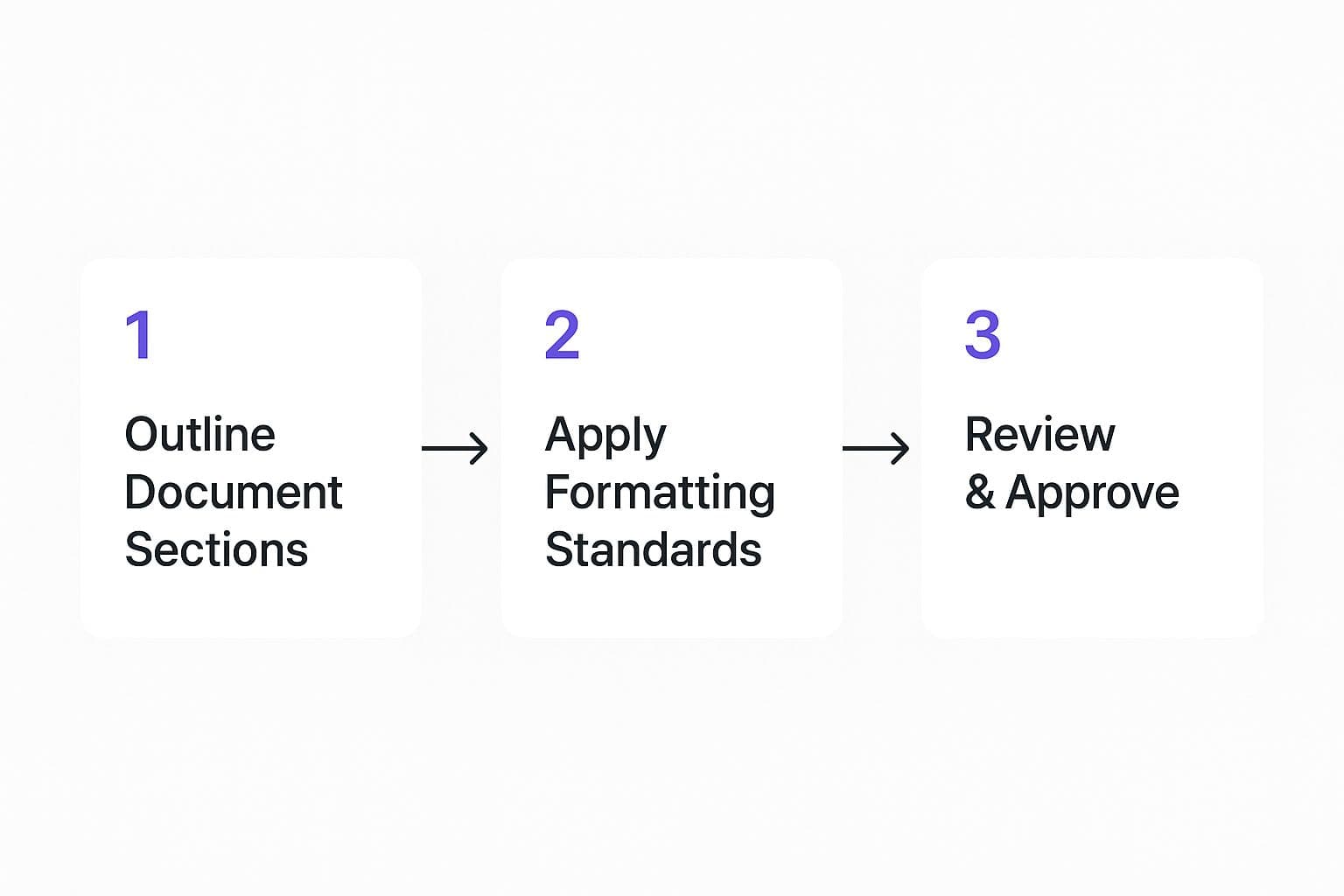
Following a process like this ensures every requirement, from the high-level story down to the granular criteria, is structured logically and gets formally reviewed. It's a vital step that connects the dots between defining what you need and actually building it. Of course, before you get this deep, it's essential you understand how to define project scope to make sure your requirements stay within the project's guardrails.
Structuring Your Technical Requirements Document
Let's be honest—even the most detailed, well-written requirements are completely useless if they’re just a chaotic jumble of notes. When a document is disorganized, it doesn't just create confusion; it actively invites mistakes and wastes a ton of time and money.
To prevent that nightmare scenario, you need a clear, predictable structure. Think of it as the reliable framework that turns your requirements into a single source of truth for the entire team—something developers, designers, and stakeholders can actually use to find what they need without getting lost.
A Battle-Tested Document Framework
After years of seeing what works (and what definitely doesn't), I've settled on a standard structure that holds up for nearly any software project. It’s designed to capture everything logically, from the high-level vision all the way down to the nitty-gritty details.
I always make sure to include these core sections right at the top:
- Introduction and Vision: Start by briefly explaining the problem you're solving and the main business goal. This gives everyone crucial context from the get-go.
- Scope Definition: Be painfully explicit about what is in scope and, just as importantly, what is out of scope. This is your number one defense against scope creep.
- User Personas and Stories: Who are we building this for? What are their goals? Describing the target users keeps the team focused on building something people will actually want to use.
- System Context and Diagrams: A picture really is worth a thousand words here. A high-level architecture diagram or a data flow chart can explain complex system interactions far better than a wall of text.
Once you’ve laid that foundation, you can get into the specifics.
Separating Functional and Non-Functional Requirements
This is a big one. Your document absolutely needs dedicated, separate sections for functional and non-functional requirements. Lumping them together is a classic mistake that leads to pure confusion.
For instance, under Functional Requirements, you might have a "User Authentication" section detailing login, logout, and password reset flows. Then, in the Non-Functional Requirements section, you'd specify the technical constraints, like "all user passwords must be hashed using Argon2" or "login attempts must have a response time under 500ms." The separation makes everything crystal clear.
Pro Tip: Never assume a term or acronym means the same thing to everyone. A well-maintained glossary at the beginning or end of your document is a lifesaver. Defining terms like "active user," "session," or any project-specific jargon eliminates ambiguity and ensures everyone is speaking the same language.
Choosing the Right Tools for the Job
The tools you use to write and manage your requirements can make or break the whole process. Sure, a Word doc or Google Doc might seem fine for a tiny project, but they become a disorganized mess almost immediately as things scale up.
Modern tools give you so much more power:
- Wikis (Confluence, Notion): These are fantastic for creating a "living document" that’s easy for everyone to navigate and update. They’re built for collaboration, versioning, and embedding diagrams.
- Project Management Tools (Jira, Asana): This is the go-to for most Agile teams. You can link requirements (often as user stories) directly to development tasks, which gives you incredible traceability from the initial idea all the way to the finished code.
Picking the right tool isn't just a minor administrative choice anymore; it’s a strategic decision. In fact, the market for technical writing tools is projected to hit USD 1.2 billion by 2032. This growth is a direct result of the industry's push for better systems to handle increasingly complex projects.
Writing with Clarity and Precision
You've got your document structure locked in. Now comes the real art and science of writing requirements—the part where a good document becomes a great one. This is where you transform a simple plan into a powerful tool that actively prevents confusion, rather than accidentally causing it.
The goal is to eliminate any room for misinterpretation. In software development, ambiguity is the project’s worst enemy. Vague, subjective words like "fast," "simple," or "user-friendly" are absolute project killers because they mean something different to everyone on the team. Your job is to replace those fuzzy ideas with hard, quantifiable metrics that can be tested.
Be Specific and Quantifiable
Think about it. A requirement like, "The image upload process should be fast," is a wish, not a specification. What does "fast" actually mean?
A much stronger requirement would be: "Image uploads under 5 MB must complete within 3 seconds on a standard 3G connection." See the difference? We've gone from a vague hope to a concrete, testable outcome. The development team now has a clear performance target, and the QA team knows exactly what to validate.
Let's look at a couple more examples of this in practice:
- Instead of: "The dashboard should be intuitive."
- Try this: "A new user must be able to create their first report within 90 seconds of logging in, without needing to consult help documentation."
- Instead of: "The system needs to handle many users."
- Try this: "The system must support 500 concurrent users with an average API response time of less than 200ms."
This level of precision is truly non-negotiable for writing technical requirements that work.
Use Visuals to Explain Complexity
Sometimes, words just can't carry the full weight of a complex idea, especially when you're mapping out intricate user flows or system architectures. When text gets dense and confusing, a visual aid is your best friend. A simple diagram often communicates an idea far more effectively than a wall of text ever could.
I've seen a single, well-drawn flowchart end hours of debate about a user journey. It forces everyone to agree on the exact sequence of steps, decision points, and potential outcomes in a way that words alone just can't.
Don't hesitate to embed these directly into your document. They're not just supplemental; they are part of the requirement. Consider using:
- Wireframes: Low-fidelity sketches showing the layout and key components of a user interface.
- Flowcharts: Diagrams that map out a process, user journey, or decision logic step-by-step.
- System Diagrams: High-level illustrations that show how different parts of the system interact with each other and with external services.
These visuals become a shared source of truth, ensuring everyone from designers to backend engineers is working from the same mental model.
Implement a Peer Review Process
Finally, never, ever write your requirements in a silo. Once you have a solid draft, it's absolutely critical to get another set of eyes on it—ideally from both technical and non-technical teammates. A developer might spot a technical assumption that’s impossible to implement, while someone from marketing might point out that a proposed feature completely misunderstands the customer's actual goal.
This peer review isn't about finding fault; it's about collaborative refinement. Think of it as your final quality check to ensure the requirements are clear, complete, and genuinely understood by everyone with a stake in the project. This simple step is one of the single most effective ways to align the entire team and catch expensive misunderstandings before a single line of code gets written.
Tools That Streamline Requirement Writing

Let's be honest: writing technical requirements in a vacuum is a recipe for disaster. Relying on static Word documents or endless email chains just doesn't cut it anymore. Fortunately, we have a whole host of tools that can make this process more collaborative, efficient, and frankly, less painful.
The move towards specialized software isn't just a hunch; it's a massive industry trend. The global market for technical writing tools was valued at around USD 289.1 million back in 2022 and is on a steep upward trajectory. You can see the market growth projections for technical writing tools to get a sense of just how vital these platforms have become.
Collaborative Powerhouses: Jira and Confluence
If your team works in an Agile environment, the duo of Jira and Confluence is almost unbeatable. They work together to create a living ecosystem where your requirements directly inform the development work.
- Confluence is your single source of truth. Think of it as your project's wiki. This is where you'll flesh out the full technical requirements document, from user personas and business goals to the nitty-gritty functional specs. Everyone can comment, edit, and contribute in one place.
- Jira is where the rubber meets the road. You break down those big requirements from Confluence into actionable user stories and tasks. The key is to link every Jira ticket directly back to its corresponding Confluence page. This creates an unbroken, traceable line from the initial concept to the finished code.
This integration is a game-changer. A developer can open a ticket in Jira and immediately click through to the full context in Confluence. No more hunting for documents or guessing what a requirement means.
My personal rule is simple: if it's a "living document" that needs context, discussion, and detail, it belongs in Confluence. If it's a specific chunk of work that a developer can build in a sprint, it's a ticket in Jira. The magic happens when you link them together.
Dedicated Requirements Management Tools
For some projects, especially in large, complex, or heavily regulated industries, you might need more firepower than Jira and Confluence can offer. This is where dedicated requirements management (RM) tools come in. These platforms are purpose-built to capture, track, and manage requirements through every stage of the project.
These tools are packed with advanced features that are crucial for high-stakes projects:
- Granular Traceability: They excel at creating intricate links between business requirements, functional specs, test cases, and development tasks, giving you a complete audit trail.
- Version Control: They offer serious versioning and change management. This ensures everyone is working from the latest approved set of requirements, which is critical for compliance.
- Impact Analysis: When one requirement inevitably changes, these tools can instantly show you everything else that’s affected—from other requirements to tests and tasks.
Getting your requirements locked down in a tool like this has another huge benefit. With clear, well-defined specs, you have a much stronger foundation for estimating the project timeline. If you're ready for that step, we have a whole guide on estimating software development time that picks up right where this leaves off.
Common Questions About Technical Requirements
Even with the best templates and processes in place, you're bound to run into some tricky questions when you're deep in the trenches writing technical requirements. Let's tackle a few of the most common sticking points that trip up product managers, writers, and developers.
How Detailed Should Technical Requirements Be?
This is the classic "how long is a piece of string?" question. The sweet spot is providing just enough detail to make the requirement completely unambiguous and testable, but without telling your engineering team how to build it.
Your job is to define the "what," not the "how."
For instance, instead of dictating a specific technology like, “Use a PostgreSQL database,” focus on the business need. A much better requirement would be: “The system must persist user data securely and support at least 500 transactions per second during peak hours.” This gives the engineering team the autonomy to pick the right tool for the job while still guaranteeing the core business goal is met.
Ultimately, a requirement is detailed enough if a developer can build from it and a QA engineer can write a specific test case against it. No more, no less.
What Is the Biggest Mistake to Avoid?
If I had to pick just one, it's ambiguity. Hands down. Making assumptions and using fuzzy, subjective words is the fastest way to derail a project. Terms like "fast," "simple," or "user-friendly" are project-killers unless they’re backed by hard numbers.
Every single requirement must be verifiable. If you can't test it, it's not a real requirement. This mindset forces you to think in concrete outcomes instead of vague wishes, which is the secret to effective technical documentation.
So, instead of writing "The page should load quickly," you need to be specific. A rock-solid requirement looks like this: "The product details page must achieve a Google PageSpeed Insights score of 90 or higher on desktop." See the difference? All the guesswork is gone, and the team has a clear, measurable target.
How Do Technical Requirements Differ in Agile vs. Waterfall?
Your approach to documentation will look completely different depending on which methodology you're using. They are two very different worlds.
- Waterfall: In a traditional Waterfall project, you define everything upfront in a massive, comprehensive document (the classic Software Requirements Specification). This document is then "frozen." Any changes have to go through a formal, often bureaucratic, change control process. The goal is to get it all right from the very beginning.
- Agile: Agile flips that on its head. Requirements evolve in small, iterative cycles. They usually start as high-level user stories in a product backlog and only get fleshed out with details "just-in-time" before a development sprint begins. The documentation is lightweight, dynamic, and always secondary to working software and team collaboration.
Waterfall demands a complete, perfect blueprint before anyone lays a single brick. Agile embraces the fact that you'll learn as you go, building the picture piece by piece. This flexible approach is often a much better fit for projects where the final outcome isn't set in stone, like when you're still figuring out the differences between an MVP vs prototype to test an idea in the market.
Ready to turn your idea into a tangible product without getting bogged down in endless documentation cycles? At Iglu Digital, we specialize in building market-ready MVPs on a fixed price, agreed up front. We transform your vision into a functional, user-focused solution so you can start gathering real-world feedback fast. Launch your MVP with us.