Software Implementation Planning That Actually Works

Table of Contents
So, you're about to kick off a new software implementation. The first step isn't choosing the tech or building a Gantt chart; it’s crafting a solid implementation plan. This is your strategic roadmap, detailing everything from project goals and stakeholder buy-in to risk management and user training. It’s what separates a smooth transition from a chaotic one.
Why Good Software Implementations Go Bad

Let's be real for a moment. Most software implementation failures aren't a shock. They're the predictable outcome of a plan that was flawed from the get-go. Too often, organizations get swept up in the promise of shiny new features, believing the technology alone is the magic bullet for their problems. This tech-first obsession almost always backfires when the "perfect" software creates more problems than it solves.
The real culprits are almost always human, not technical. I've seen it happen time and again. A company rolls out a sophisticated new ERP system. The code is clean, the servers are humming, but the project is a disaster. Why? Because no one accounted for the sales team's pushback on a new data entry process or the finance department's confusion over the new reporting formats. The project didn't derail because of bugs; it derailed because the human side of the change was completely ignored.
The True Cost of Poor Planning
This isn't just a feeling; the numbers back it up. Looking at historical data, ERP project failure rates can run as high as 55% to 75%. Poor planning is a massive contributor, with a dismal 11% of projects actually going live on schedule. And the biggest hurdle? People. A staggering 82% of CIOs cite resistance from employees as the primary obstacle to success. You can dig into more ERP statistics to see just how deep these challenges run.
A technically perfect implementation is useless if no one uses the software correctly—or at all. Your plan has to prioritize people just as much as it prioritizes technology.
Shifting to a Proactive Approach
To sidestep these common disasters, a successful software implementation planning process needs to be built on three core pillars. This guide is designed to help you master them.
- Strategic Scoping: This is about moving beyond a simple features list to define concrete business outcomes. You have to start by asking, "What specific problem are we actually solving?" and then set clear, measurable goals from there.
- Stakeholder Alignment: Success hinges on getting buy-in from everyone, from the executive sponsor signing the checks to the end-users in the trenches. This pillar is all about proactive communication and making sure every group feels heard, valued, and understood.
- Change Management: This is the big one—the most critical and most frequently overlooked piece of the puzzle. It means creating a dedicated plan to guide your team through the transition with solid training, reliable support, and constant communication about the "why" behind it all.
Get these three elements right, and you can turn a high-stakes, high-stress project into a predictable success story.
Defining What Success Actually Looks Like
This is where your software implementation planning really gets serious. It’s not about rattling off a list of cool features; it’s about pinning down the specific, tangible business outcomes you're aiming for. A fuzzy goal like “improve collaboration” is a classic recipe for a project that drags on forever because nobody can agree on what “improved” actually means.
Your first job is to dig past the surface-level symptoms and uncover the real, day-to-day problems your team is grappling with. The only way to do that is by talking to the people who will be in the trenches, using this new software every day.
From Vague Ideas to Measurable Goals
Nothing beats a good old-fashioned stakeholder interview for this. Let's say a company is bringing in a new project management tool. The initial request is often something generic like, "we need to get more organized." That's a starting point, but it's not a goal.
Once you start talking to people, you might find the real pain point is that the marketing and product teams are constantly blowing past deadlines because of messy, inefficient handoffs. Now that is something you can sink your teeth into.
Suddenly, the goal transforms from a hazy idea into a sharp, measurable objective: "reduce cross-departmental project delays by 20% within six months of launch." This kind of clarity is absolutely essential. It gives everyone a clear target to aim for and provides a concrete way to prove the software delivered real, bottom-line value. To get this right, you can learn more about establishing the right KPIs for software development in our detailed guide.
A successful implementation is measured by business impact, not by checking off a list of features. If you can’t measure it, you can’t manage it, and you certainly can’t celebrate it.
Creating a Rock-Solid Scope Document
With your measurable objectives locked in, it's time to build your scope document. Think of this document as your project's constitution. It lays down firm boundaries and acts as your primary defense against the dreaded scope creep that derails so many otherwise good projects.
A well-defined scope document shuts down those "can we just add one more thing?" requests that inevitably pop up mid-project, saving your timeline and your budget. It becomes the team's North Star, guiding every single decision from kickoff to launch.
This isn't just a technical document for developers; it needs to be a shared agreement that everyone—from the executive sponsor down to the junior engineer—can understand. You're defining what you are building and, just as crucially, what you are not building.
Here’s a breakdown of what should go into that document to make sure it’s airtight.
Key Elements of a Project Scope Document
| Component | Description | Example |
|---|---|---|
| Project Objectives | The high-level business goals the software will achieve. What problem are you solving? | "Reduce average customer support response time by 30% in Q3." |
| Deliverables | A list of the tangible outputs. What will be created? | A new ticketing dashboard, an automated email response system, and a knowledge base integration. |
| Key Features | The specific functionalities the software must have to meet the objectives. | Ticket auto-assignment, real-time reporting on agent performance, and canned response templates. |
| Exclusions | What is explicitly not being built. This is critical for managing expectations. | "This project will not include a customer-facing chatbot or social media integrations." |
| Constraints & Assumptions | Any limitations (budget, timeline, tech) or things you're taking for granted. | "The project must be completed within a $50,000 budget. We assume the existing CRM API is stable." |
| Stakeholders | Who is involved? List the key people and their roles. | Jane Doe (Project Sponsor), John Smith (Product Manager), Marketing Team (End Users). |
Getting this document right ensures everyone is on the same page and keeps the entire project focused on hitting its core objectives without getting sidetracked.
Assembling Your Implementation A-Team

A brilliant plan is just a document without the right people to bring it to life. Putting together your implementation team isn’t about just grabbing whoever is available from the IT department. It’s a strategic, cross-functional mission that needs a careful blend of leadership, technical know-how, and boots-on-the-ground knowledge of how things actually get done. Your software implementation planning has to nail this from the get-go.
The entire project’s success can often balance on one key role: the Project Sponsor. This is not a ceremonial title. Think of this executive-level champion as your secret weapon for cutting through organizational red tape, securing the resources you need, and keeping morale high when the inevitable roadblocks pop up.
Research backs this up. A whopping 77% of organizations that completed ERP projects pointed to institutional leadership as a critical factor for success. And don't forget communication—60% highlighted it as a top skill for implementation teams. You can dig into more of these insights about successful ERP implementations on netsuite.com.
Identifying Your Key Players
Beyond your sponsor, the core team needs a specific cocktail of expertise. You have to find and empower people who see the project from different angles. This is the only way to ensure the final product is both technically solid and genuinely useful for the people who will live in it every day.
- Project Manager: This is your field general. They run the day-to-day operations, own the timeline, and act as the central communication hub keeping everyone connected and the project moving forward.
- Technical Lead: This person (or small team) is responsible for the nuts and bolts—system configuration, data migration, and making sure the new tool plays nicely with your existing software stack. They turn business needs into working code.
- Subject Matter Experts (SMEs): These are your power users from departments like sales, finance, or operations. They understand the current workflows inside and out, which makes them indispensable for user acceptance testing (UAT) and championing the new system to their peers.
One of the biggest mistakes I see is building a team made up entirely of IT folks. You can build a technically flawless system, but without the deep process knowledge from your SMEs, you risk creating something that nobody can actually use to do their job.
Establishing a Communication Rhythm
Once you have your A-team in place, you need a communication plan. And a one-size-fits-all email blast won't cut it. You have to tailor your updates to the audience.
Your C-suite, for example, needs the 30,000-foot view. Give them high-level, concise summaries that focus on progress against business goals and budget. The core project team, on the other hand, needs the nitty-gritty details—daily stand-ups on task status, roadblocks, and technical specs.
This proactive approach keeps everyone in the loop, invested, and on the same page. Regular, targeted communication prevents nasty surprises, manages expectations, and helps maintain momentum all the way to go-live. A simple communication matrix can be a lifesaver here, outlining who gets what info, how often they get it, and through which channel.
Building a Realistic Project Roadmap
You’ve got your team, you’ve nailed down your goals—now comes the hard part. It’s time to turn all that vision and planning into an actual, concrete roadmap. I can't stress this enough: a good roadmap is more than just a Gantt chart with a bunch of dates. It's a strategic guide that keeps everyone aligned, manages expectations, and builds real confidence across the business.
One of the first big decisions you'll make is how you're going to roll this out. Are you going for the high-stakes “big bang” launch, where everything goes live at once? Or do you take a more measured, phased approach, introducing the new software bit by bit?
The big bang can feel tempting because it seems faster, but it's incredibly risky. A single critical bug can paralyze your entire operation. Trust me, I've seen it happen. For most organizations, a phased rollout is the smarter play. It lets your team learn as they go, apply those lessons to the next phase, and manage the change in smaller, less disruptive pieces.
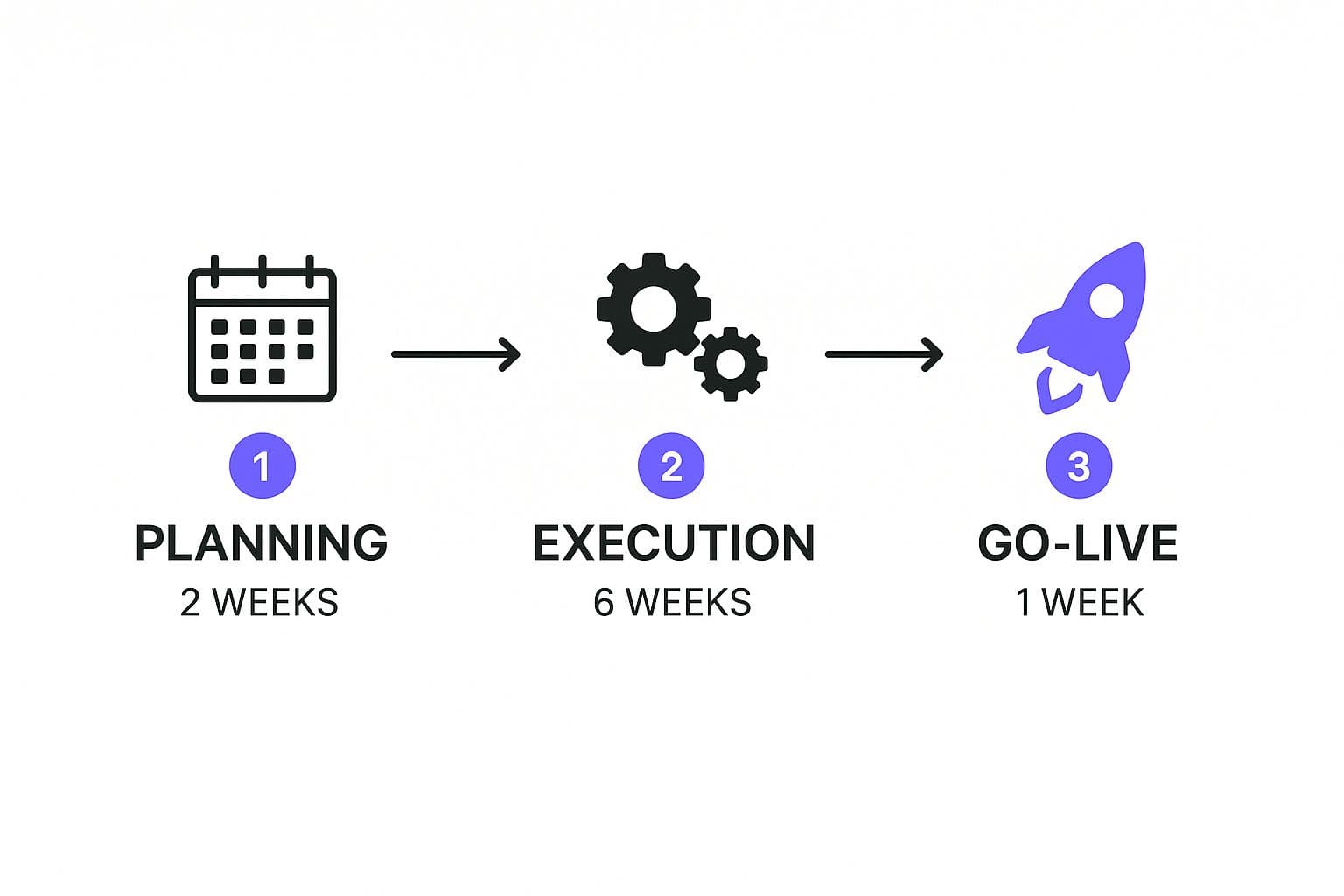
Breaking a huge project into distinct, sequential stages like this is what makes it feel achievable. Each phase has its own focus and timeline, turning an intimidating mountain into a series of manageable hills.
Breaking Down the Implementation into Phases
Let’s walk through a real-world example. Imagine a mid-sized e-commerce company bringing in a new inventory management system. A phased roadmap would slice this project into clear, logical stages.
- Discovery & Configuration (Weeks 1-2): This is the deep dive. Your tech team sits down with the warehouse experts—the people who actually live these processes every day—to map out their workflows. The goal is to configure the new system to mirror reality, flagging any customizations that will be absolutely necessary.
- Data Migration (Weeks 3-4): This is where projects often get bogged down. You'll want a dedicated team focused on cleaning up existing product and supplier data before moving it. A small test migration is a non-negotiable here. It’s the best way to catch errors before they become massive headaches.
- Testing & UAT (Weeks 5-6): Now, the system goes back to those same warehouse experts for User Acceptance Testing (UAT). They need to pound on it, running through their daily tasks—receiving stock, picking orders, generating reports. You need them to confirm everything works in a real-world context before it touches live operations.
- Training (Weeks 7-8): Once the system is stable, it's all about the people. The project team needs to run hands-on training sessions for the entire warehouse staff. The goal is competence and comfort before the pressure of go-live day.
Setting Meaningful Milestones
Your roadmap shouldn't just be a long timeline; it needs to be punctuated with meaningful milestones. These aren't just dates to hit. They are critical checkpoints that signal the completion of a major piece of work, like "Data Migration Complete" or "All Staff Trained."
Milestones do a couple of really important things. They give sponsors and stakeholders clear moments to check in and see real progress. They’re also huge for team morale, creating opportunities to celebrate small wins and build momentum for the journey ahead.
A project without milestones is like a road trip without signposts. You might be moving, but you have no idea if you're actually getting closer to your destination.
The Non-Negotiable Buffer
Finally, here’s a piece of advice born from experience: every single project roadmap needs a contingency buffer. Things will go wrong. It's a guarantee. You'll hit unexpected technical snags, key people will get pulled onto other priorities, or a business need will shift. For more on how this impacts project finances, our guide on the cost of software development dives deeper.
Building a buffer of 15-25% into your timeline and budget isn’t being pessimistic; it’s being a professional. That cushion gives your team the space to solve problems without blowing up the whole project, making your plan resilient enough to survive contact with reality.
Getting Ahead of Risks and Resistance

Let’s be honest. The biggest hurdles you’ll face in any software implementation are rarely technical—they’re almost always human. It’s easy to get lost in the weeds of code and configurations, but the real measure of success is how well your people adapt to the new reality you're building.
The data backs this up. For 33.3% of companies, managing organizational change is their biggest challenge. And an overwhelming 82% of experts point to resistance from their own teams as a critical barrier to success. This is why a proactive plan for managing risk and resistance isn't just nice to have; it's the core of a successful project.
Building Your Risk Register
Your first line of defense is a simple but incredibly effective tool: the risk register. This doesn't need to be some complicated document locked away in a project management system. At its heart, it's just a living spreadsheet where you can identify potential problems, think through their impact, and outline a clear plan to deal with them.
This simple exercise shifts you from being a firefighter to a strategist.
Start by brainstorming all the things that could go wrong. Get specific.
- Technical Risks: What if the new software just won't talk to our existing CRM? What's our backup plan if we discover data integrity issues during the migration?
- Operational Risks: What happens if our lead developer quits halfway through the project? What's our contingency if we start approaching the budget ceiling?
- Human Risks: What if users just don't log in after launch? What if the training sessions are a flop?
For every risk you list, assign an owner and sketch out a mitigation strategy. For instance, if data integrity is a major concern, your plan might be to run three separate, small-scale test migrations before attempting the full-scale launch. This document brings a sense of calm and preparedness to what can otherwise feel like a chaotic process.
Successful adoption doesn’t happen by chance—it's engineered through empathy and smart planning. You have to address the "what's in it for me?" question for every single user.
Mastering the Art of Change Management
Once you've got a handle on the technical and operational what-ifs, you can turn your attention to the most critical piece of the puzzle: the people. Winning over skeptics and turning resistant employees into genuine advocates is where your project will truly succeed or fail. It all begins by communicating the "why" long before you ever get to the "how."
You need to frame the benefits in their terms, not the company's. Will this new tool eliminate that awful manual report they spend three hours on every Friday? Will it give them instant access to data they currently have to beg for? Draw a straight line from the new software to their daily work.
Next, get them involved. And I mean early. Invite key end-users to participate in user acceptance testing (UAT). Not only is their feedback pure gold for catching usability issues you'd otherwise miss, but their involvement also fosters a sense of ownership. They become co-creators of the solution, not just people being forced to accept it. Of course, when you're gathering all this great feedback, you also need to know https://iglu.dev/blog/how-to-avoid-scope-creep.
Finally, design a training program that actually respects their time and addresses their specific concerns. Generic, one-size-fits-all training is a recipe for disengagement. Instead, create role-specific workshops that walk users through the exact workflows they’ll be using every day. This targeted approach builds real confidence and makes sure your team isn't just ready but is genuinely willing to embrace the change.
Your Questions on Implementation Planning Answered
Even with the best plan in hand, some practical questions always seem to pop up once you're in the thick of it. Let's tackle a few of the most common ones I hear from teams on the ground.
What Is the Biggest Mistake in Software Implementation Planning?
By far, the most common and costly mistake is underestimating the human side of the equation—change management. It's so easy to get laser-focused on the technical details like configuration, data migration, and integrations, and completely forget about the people who will actually have to use the new system every day.
There's this dangerous assumption that if you build a technically superior tool, everyone will just naturally start using it. The reality is, resistance to change, confusing training (or a lack of it), and poor communication are the real project killers. In fact, they’re the primary reasons that up to 75% of ERP projects fail.
A technically perfect system that nobody uses correctly is just an expensive failure. Smart planning dedicates just as much energy to training, communication, and getting user buy-in as it does to the technology itself.
Should We Use a Big Bang or a Phased Approach?
This really comes down to your organization's complexity, your tolerance for risk, and the nature of the software you're implementing.
A "big bang" launch, where everything goes live at once, can feel tempting. It’s faster and seems cheaper on paper. But it's an all-or-nothing bet that carries a huge risk of catastrophic failure. If one critical piece breaks, the whole system can come crashing down.
The "phased" approach is almost always the safer, smarter play. By rolling out the software department-by-department or module-by-module, you give your team room to breathe and adjust. This strategy lets you:
- Learn as you go: Lessons from the first phase make every subsequent phase smoother.
- Ease people in: You’re introducing change in manageable bites, not one giant, overwhelming wave.
- Contain problems: If something goes wrong, you can isolate the issue to one team instead of bringing the entire company to a standstill.
For most businesses, especially when dealing with complex systems, going with a phased rollout is the far more manageable and predictable path.
How Do You Create a Realistic Timeline and Budget?
Realistic estimates don't come from wishful thinking; they come from a deep and honest discovery process. It starts with breaking the entire project down into the smallest possible tasks.
Once you have that granular list, you can sit down with your implementation partner and internal experts to put real numbers against each item. Don't guess.
And here's the most important part: build in a buffer. A contingency of 15-25% for both your timeline and your budget isn't being pessimistic—it's being a professional. It's acknowledging that unexpected things will happen. If you have data from similar projects you've done in the past, use it. And be relentlessly transparent with stakeholders about the risks from day one.
At Iglu Digital, we specialize in turning your vision into a market-ready MVP for a price agreed before a line of code is written, removing the uncertainty from your development process. Learn more about our rapid, results-driven approach at iglu.dev.