
Effective Implementation Plan for Software: Complete Guide
Table of Contents
Think of a software implementation plan as your project's GPS. It's the detailed, step-by-step guide that maps out how you'll get a new software system up and running within your organization. This isn't just about installation; it’s the strategic document that connects the technology you've just bought to the business results you're trying to achieve, making sure the whole process is as smooth as possible.
Why You Need a Strategic Software Implementation Plan

Too many companies treat a software implementation plan like a simple to-do list. That’s a huge mistake. In reality, it's the strategic blueprint that makes the difference between a smart technology investment and a very expensive headache. Without a solid plan, even the most powerful software can backfire, leading to frustrated users, blown budgets, and operational chaos.
Let's imagine a real-world scenario. A mid-sized e-commerce company decides to switch to a new Enterprise Resource Planning (ERP) system. But they dive in without a plan. Suddenly, the warehouse team can't figure out how to log new inventory. The finance department is struggling to generate critical reports, and the customer service team is blind to order statuses. The outcome? A mess of internal friction, lost sales, and a big-ticket technology purchase that’s causing more problems than it's solving.
Now, let's replay that scenario with a proper implementation plan in place. The project has crystal-clear goals, a realistic timeline, and well-defined roles. Everyone, from the executive team down to the warehouse staff, knows exactly what their part is. This kind of structured, thoughtful approach ensures the technology actually empowers the business, rather than getting in its way.
From Document to Strategic Roadmap
A well-crafted software implementation plan is so much more than a document that gets filed away. It's a living communication tool and a critical risk management strategy. It forces everyone involved to think through the potential roadblocks before they happen, getting all stakeholders aligned on what success actually looks like.
The benefits you get from this kind of strategic thinking are real and hit the bottom line hard:
- Higher User Adoption: People are far more likely to embrace a new system when training and communication are baked into the plan from day one.
- Budget Adherence: A detailed plan lets you forecast costs with much greater accuracy, avoiding those nasty, unexpected expenses down the road.
- Meeting Business Objectives: The plan acts as a constant check to make sure the software is being set up to solve the actual business problems it was bought for.
- Reduced Disruption: A carefully managed rollout keeps operational downtime to a minimum, so the business can keep running.
A software implementation plan isn't about controlling every single detail with an iron fist. It's about building a framework that gives your team the flexibility to handle challenges without ever losing sight of the ultimate goal. It brings clarity to a complex process.
This kind of proactive planning has never been more important. In 2024, worldwide software spending hit roughly USD 675 billion, a staggering increase from USD 454 billion back in 2020. This explosive growth shows just how much businesses are counting on software to drive innovation and efficiency. As companies pour more and more money into new technology, a rock-solid implementation plan is the only way to guarantee those investments pay off. You can read more about these global software spending trends and their impact on innovation.
Defining Your Project Scope and Core Objectives

Before you ever touch a line of code or schedule the first training session, you have to lay the groundwork. The success of any software implementation hinges on a rock-solid foundation, and that foundation is built by defining a crystal-clear project scope and a set of measurable, core objectives.
Skipping this step is like setting out on a road trip with no map and no destination. You'll burn a lot of fuel and end up somewhere you never intended to be. This early planning phase is about more than just a wishlist of features; it's where you translate real-world business headaches into precise, actionable goals.
Let's take a real-world example: a healthcare provider rolling out a new patient management system. Their high-level goal isn't just "to get new software." A truly useful objective sounds more like this: "to reduce patient check-in time by 25% within three months of going live." Now that's something you can build a plan around.
Translating Business Needs into SMART Objectives
So, how do you get that kind of clarity? You have to talk to the people on the ground—the ones who will actually use the software every day. Stakeholder interviews are non-negotiable here.
Sit down with the nurses, the receptionists, the billing specialists, and the clinic managers. Ask them about their biggest daily frustrations with the old system. Where are the bottlenecks slowing them down? What takes way longer than it should?
These conversations give you the raw material to build your SMART objectives:
- Specific: Nail down exactly what you need to accomplish. Instead of a vague goal like "improve patient communication," you define something concrete: "implement an automated appointment reminder system via SMS and email."
- Measurable: How will you know you've succeeded? Attach a number to it. For instance, "achieve a 90% user adoption rate among clinical staff within 60 days of go-live."
- Achievable: Be realistic. The goal has to be possible given the resources, budget, and timeline you have.
- Relevant: The objective must clearly support a larger business goal, like boosting patient satisfaction or making the clinic run more efficiently.
- Time-bound: Every goal needs a deadline. A good example is, "migrate all historical patient data by the end of Q2."
Getting these objectives down on paper ensures everyone, from the CEO signing the checks to the IT intern running cables, is working from the same playbook. It becomes the north star for every decision you make along the way.
The Power of Defining What's Out of Scope
Just as critical as defining what the project will do is being brutally honest about what it won't do. This is your single best defense against scope creep—that silent project killer where "just one more feature" gets added again and again, blowing up your timeline and budget.
For our healthcare provider, this might mean explicitly stating that the initial rollout will not include a patient-facing mobile app or an integration with a third-party pharmacy system. Those can come later, in Phase 2.
Scope creep often comes from a good place—people get excited and see new possibilities. But it can derail even the best-laid plans. By setting clear boundaries upfront, you empower your project manager to politely but firmly say "no" to requests that fall outside the agreed-upon plan, keeping everyone focused.
This "out of scope" list is all about managing expectations and preventing future arguments. It forces everyone to prioritize what's absolutely essential for launch day.
Documenting the Foundation in a Project Charter
All of this foundational work—the objectives, the scope, the stakeholders—gets pulled together into a document called a Project Charter. This isn't some hundred-page novel nobody will read. It’s a concise, high-level summary that serves as the official green light for the project. Think of it as the project's birth certificate.
The charter creates alignment between the business leaders holding the purse strings and the technical teams doing the work. It’s the single source of truth everyone can refer back to when questions about project direction or priorities pop up.
Here’s a quick look at what usually goes into one.
Core Components of a Project Charter
This table breaks down the essential elements to include in your initial planning document, with examples for clarity.
| Component | Description | Example (Patient Management System) |
|---|---|---|
| Project Goal | A high-level statement of the project's purpose. | Implement a centralized patient management system to improve operational efficiency and patient data accuracy. |
| SMART Objectives | Specific, measurable outcomes the project will achieve. | Reduce administrative errors in patient records by 40% within six months of launch. |
| Scope Statement | A summary of what the project will deliver. | The system will handle patient registration, scheduling, billing, and basic reporting. |
| Out of Scope | Key features or functionalities explicitly excluded. | The project will not include telehealth integration or advanced analytics dashboards in Phase 1. |
| Key Stakeholders | Individuals or groups impacted by the project. | Clinical staff, administrative team, billing department, IT support, and clinic management. |
| Success Criteria | How the project's success will be measured. | Successful data migration with less than 1% error rate; positive feedback from 85% of staff in post-launch surveys. |
With a well-defined Project Charter in hand, you’ve not only clarified your mission but also secured the buy-in needed to move forward with confidence.
Assembling Your Implementation Team and Resources

Even the most brilliant implementation plan for software is just a document until you put the right people and resources behind it. A successful launch depends entirely on having a team with the right mix of technical skill, business insight, and leadership.
This isn't just about filling seats. It's about strategically building a group that can navigate both the technical and human challenges that will inevitably pop up.
Think about a fintech startup launching a new mobile banking app. Their plan might be flawless on paper, but what happens if the team is all developers? Who’s going to train the customer support staff? Who will champion the project to executives if they need more resources? You absolutely need a balanced team.
Identifying Your Key Players
Every project needs a core group with crystal-clear responsibilities. When roles are fuzzy, you're just inviting delays and miscommunication.
Here are the essential roles you need to lock down:
- Project Sponsor: This is the executive who champions the project from the top. They secure the budget, clear major roadblocks, and have the final say. For our fintech app, this is probably the CTO.
- Project Manager: The person who lives and breathes the implementation plan daily. They manage the timeline, wrangle the team, tackle risks, and keep communication flowing.
- Technical Lead: The hands-on expert on the software itself. They're in charge of the nitty-gritty, like configuration, data migration, and integrating with other systems.
- End-User Champions: These are your secret weapons—people from the departments who will actually use the new software. Their feedback during testing is gold, and they help get their peers on board.
Beyond this core crew, you'll likely need trainers, data migration specialists, and QA testers. A great starting point is to map out the skills you need against your current team members. This simple exercise quickly shows you where the gaps are.
To really dig into how these roles work together, especially in a dynamic setting, you can check out this detailed guide on https://iglu.dev/blog/roles-in-agile-software-development.
In-House Experts vs. External Consultants
Once you know what skills you're missing, you hit a fork in the road: train your internal team or bring in outside help? Both have their pros and cons.
| Aspect | In-House Team | External Consultants |
|---|---|---|
| Knowledge | Deep understanding of your business processes and culture. | Specialized expertise in the new software and industry best practices. |
| Cost | Lower direct costs, but you have to factor in training time. | Higher upfront fees but often more efficient for short-term needs. |
| Availability | Juggling the project with their existing workloads. | Dedicated to your project for the duration of their contract. |
| Long-Term | Builds internal know-how for future support and updates. | The knowledge might walk out the door when the project ends. |
For that fintech startup, they might have fantastic in-house mobile developers but zero experience with a specific payment gateway. In that case, bringing in a consultant just for that piece of the puzzle makes perfect sense. It lets the internal team focus on what they do best.
This kind of hybrid approach is incredibly common now. It's no surprise the global IT outsourcing market is projected to hit USD 651.54 billion in 2025 and is on track to reach USD 850.73 billion by 2030. Businesses are clearly seeing the value in tapping external partners for specialized talent.
Allocating Resources Beyond People
Your team is your most important asset, but they can't do their jobs without the right tools and a solid budget. Your implementation plan has to account for everything to avoid nasty surprises down the line.
Think of your resource plan as the fuel for your project engine. Without it, even the most skilled team will grind to a halt. You simply can't afford to wing it here.
This means looking beyond salaries and consultant fees. Your budget needs to cover things like:
- Software Licenses: Don't forget user licenses, server fees, or subscription costs.
- Hardware Requirements: Will you need new servers, laptops, or mobile devices to run the software properly?
- Training Materials: Budget for creating manuals, running workshops, or paying for third-party training.
- Contingency Fund: This one is a lifesaver. Always, always set aside 10-15% of your budget for the unexpected. That buffer can be the difference between a minor hiccup and a full-blown project disaster.
From Timelines to Training: Structuring Your Software Rollout
Alright, you've got your scope nailed down and the right people on the bus. Now comes the real work: mapping out the tactical heart of your implementation plan for software. This is where we move from big ideas to the nitty-gritty, day-by-day roadmap that guides everything from data migration and testing to user training and that all-important go-live moment.
A solid timeline is what keeps a complex process from spiraling into chaos. By breaking the project into manageable phases, each with its own set of clear deliverables and milestones, you prevent the team from getting overwhelmed. It also gives you tangible checkpoints to see how you're tracking against your goals.
Think of it like this—a typical software implementation often breaks down into three core phases: planning, development, and launch. The visual below gives you a simplified look at what this might entail.
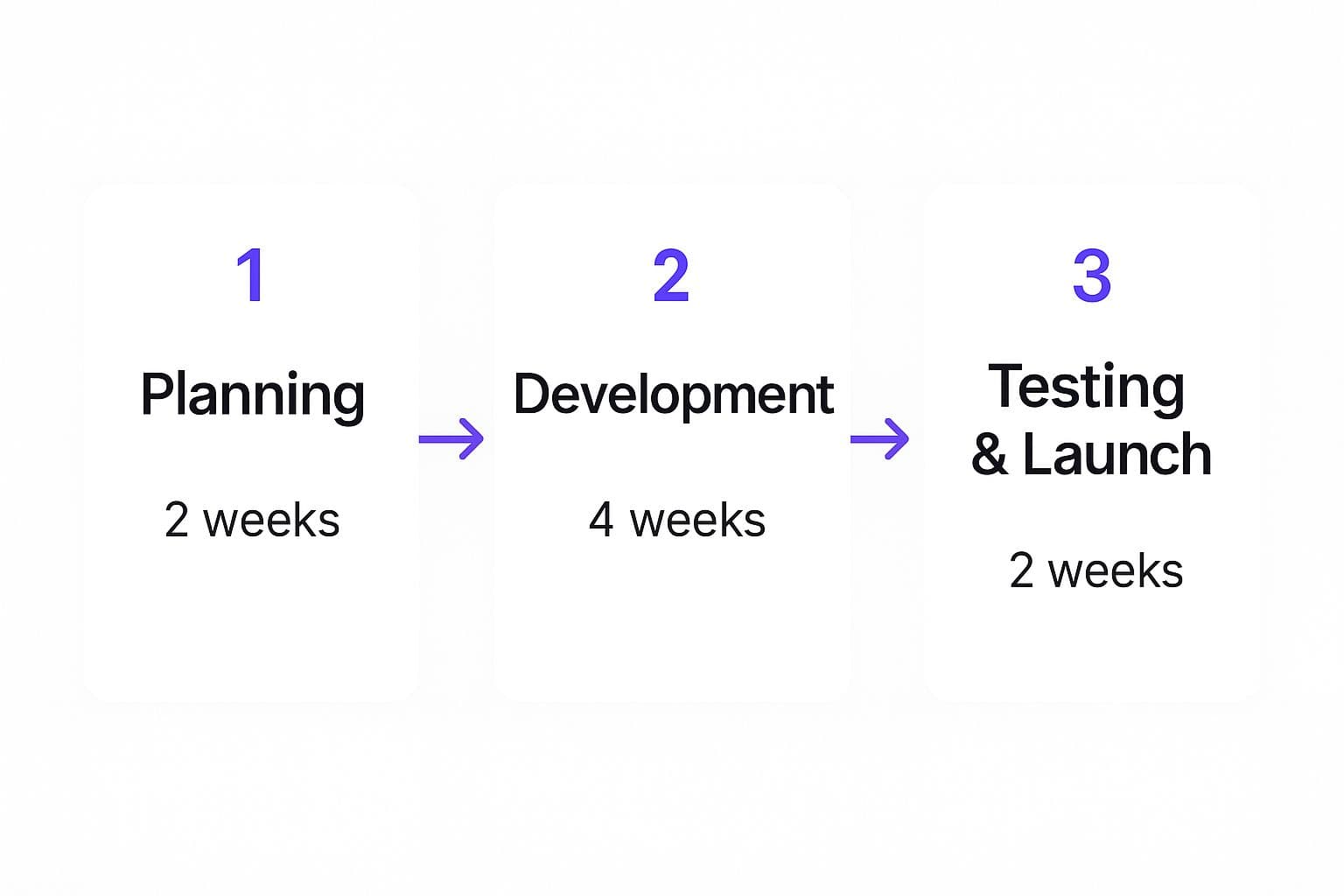
This example maps out an eight-week cycle, giving each stage a specific duration. This kind of planning is invaluable for managing resources and setting realistic expectations with stakeholders.
Choosing Your Go-Live Strategy
Not all software launches are the same. The way you choose to "go live" really depends on your company's appetite for risk, the software's complexity, and how essential the system is to your daily operations. I’ve seen three main approaches work in the field.
- The Big Bang: This is the rip-the-band-aid-off method. You switch off the old system and turn on the new one for everyone, all at once. It's fast and can be cheaper, but it carries the highest risk. If something breaks, it breaks for everyone. This approach is usually best for smaller companies or for systems that aren't mission-critical.
- The Phased Rollout: Here, you introduce the new software in controlled stages. Maybe you roll it out to one department at a time, or you release different modules of the software sequentially. This is a much safer bet because it lets you find and fix problems in a smaller environment before they impact the whole organization.
- Parallel Adoption: With this strategy, you run both the old and the new systems at the same time for a set period. It's by far the safest route but also the most expensive and resource-intensive. While it gives you a perfect safety net, it often means your staff has to do double the work, entering data into both systems.
Imagine a manufacturing company implementing a new inventory management system. A big bang rollout would be a recipe for disaster. A phased approach, starting with just one warehouse, is the smarter play. It allows them to iron out all the kinks before potentially disrupting their entire supply chain.
The Treacherous Path of Data Migration
Let's talk about one of the most underestimated and genuinely perilous parts of any software implementation: data migration. This is the process of getting all of your existing information out of the old system and into the new one. It sounds like a simple copy-and-paste job, but I’ve seen more projects get derailed here than almost anywhere else.
Data migration isn't just about moving files. It's a golden opportunity to clean house. You have to scrub your data—get rid of duplicates, fix errors, and archive old, useless information—before you even think about moving it. The unforgiving rule is "garbage in, garbage out."
Here are a few practices that have saved my skin more than once:
- Start Way Earlier Than You Think: Kick off your data audit and cleansing process long before the migration is officially scheduled.
- Do a Trial Run (or Two): Always, always, always do a test migration with a small chunk of your data. This is where you'll catch all the nasty surprises with data mapping and formatting.
- Validate, Then Validate Again: After the data is moved, run scripts to check for errors and have your actual end-users manually spot-check records to confirm everything is accurate and where it should be.
Skipping these steps can lead to corrupted data, which will poison your new system from day one and instantly destroy user trust. Just as a detailed plan is vital for building a product from the ground up, a meticulous migration strategy is non-negotiable for implementation. If you're interested in structuring these kinds of complex tech projects, our guide on how to master the process for developing an app is a great next read.
Getting Your Team On Board with Training and Communication
Here’s the thing: you can have the most brilliant software and perfectly clean data, but if your team doesn't know how to use the new system—or worse, doesn't want to—the whole project is a failure. A solid training and communication plan is what turns a technical achievement into a genuine business win.
Your communication efforts should begin weeks, if not months, before the go-live date. Keep people in the loop. Tell them why this change is happening, how it's going to make their jobs better, and what they can expect. Transparency is key.
When it's time for training, a one-size-fits-all workshop is rarely effective. You need to tailor your sessions to different user groups. The finance team and the sales team use software differently, so their training should reflect that.
I've had a lot of success with a blended approach:
- Hands-on Workshops: Let people play around in a safe "sandbox" environment where they can't break anything.
- Quick Reference Guides: Create simple, one-page cheat sheets for the most common tasks.
- Lunch-and-Learn Sessions: Host informal Q&A sessions to tackle specific questions and ease anxieties.
By investing in a thoughtful rollout structure that balances timelines, data integrity, and the human element, you're not just launching software—you're setting the stage for its long-term success.
Managing Risk and Measuring Success
A detailed plan is a powerful tool, but it's not a crystal ball. Let's be honest, even the most buttoned-up implementation plan for software is going to hit some bumps. The real difference between a project that shines and one that crashes and burns is how well you prepare for what might go wrong. This is where getting serious about risk management and success metrics becomes non-negotiable.
Simply crossing your fingers isn't a strategy. Instead, smart teams I've worked with run a "pre-mortem." It sounds a bit grim, but it’s incredibly effective. Picture this: it's six months from now, and the project has been a total disaster. What happened? When you work backward from that hypothetical failure, you start spotting the weak points in your plan before they become real-world headaches.
Getting Ahead of Risks Before They Happen
A pre-mortem is fantastic for brainstorming all the things that could derail you. These aren't always big technical glitches or budget blowouts. Sometimes, the most dangerous threat is the quietest one—like your team simply refusing to use the new tool. Once you've got a list of potential problems, you can start building a playbook to deal with them.
The best way to keep this organized is with a risk register. Think of it as a living document where you track each potential risk, how likely it is to happen, the potential damage it could cause, and exactly what you'll do about it.
Here’s what that looks like in the real world:
Implementation Risk vs. Mitigation Strategy
It's one thing to talk about risks, but it's another to see how a proactive strategy can neutralize them. The table below breaks down a few common implementation risks I've seen countless times and pairs them with practical, battle-tested mitigation tactics.
| Risk Category | Specific Risk Example | Mitigation Strategy |
|---|---|---|
| Technical | The big data migration fails, corrupting critical customer records. | Run at least two full test migrations in a sandbox environment. And always, always create a complete data backup 24 hours before you go live. |
| Budgetary | The project ends up needing 200 more development hours than you estimated, putting the budget in jeopardy. | Build a 15% contingency fund into your initial budget from day one. You also need a rock-solid change control process for any out-of-scope requests. |
| User Adoption | Employees just don't like the new system and stick to their old, inefficient workarounds. | Get "end-user champions" involved early in the testing phase. Develop role-specific training that shows them exactly how the new tool makes their job easier. |
| Resource | Your star developer, the one who knows everything, resigns right in the middle of the project. | Document every technical configuration and process meticulously from the start. Make sure you cross-train at least one other team member on the most critical parts of the system. |
Thinking this way ahead of time transforms you from a firefighter, constantly putting out crises, into a pilot who sees turbulence on the radar and calmly adjusts course.
Defining KPIs That Actually Mean Something
With your risks under control, you need to define what a "win" actually looks like. If you don’t set clear goals from the outset, you'll never be able to prove the project was worth the investment. This is where Key Performance Indicators (KPIs) come into play.
Your KPIs have to connect directly back to the business goals you laid out in the beginning. It’s not enough to just say, "we launched the software." Success is measured by the real, tangible impact the new tool has on the business.
Don't fall into the trap of tracking vanity metrics. Sure, "system uptime" is important, but it doesn't tell you if the software is actually making the business healthier. Focus on outcomes, not just outputs.
For a software implementation, effective KPIs might include things like:
- User Adoption Rate: What percentage of your team is actively using the system 30, 60, and 90 days after launch? A tool without users is just a very expensive line item.
- Process Efficiency Gains: If the software was meant to streamline invoicing, measure the average time it takes to process an invoice before and after. A 30% reduction is a victory you can take to the bank.
- Reduction in Errors: Track the number of manual data entry mistakes or customer support tickets tied to a specific process. A big drop is hard proof that the system is improving quality.
- Return on Investment (ROI): This is the ultimate bottom line. You need to calculate the financial gains from better efficiency and lower costs and weigh them against what you spent on the project.
These are the numbers that provide cold, hard evidence that your plan worked. They’re essential for showing value to stakeholders and making the case for future tech investments. Mapping these KPIs is also a perfect bridge to building a strategic vision for your technology, which is a core part of creating a great product roadmap. To dive deeper, check out our guide on how to create a product roadmap, as it’s a natural next step after a successful launch.
The software world is only getting bigger and more complex. By 2025, the software development industry is projected to hit nearly USD 741 billion in global revenue, with job growth climbing over 20%. This massive expansion means that successful software projects must be built with clear data and performance metrics baked in from the start. As you can read in the trends driving software development growth on ManekTech, this isn't just a good idea—it's what the market demands.
By pairing smart risk management with outcome-focused KPIs, your plan becomes more than just a schedule. It becomes a powerful tool for driving—and proving—real business value.
Got Questions? We've Got Answers
Even with the best plan in the world, you're bound to hit a few bumps in the road when implementing new software. It’s just the nature of the beast. Here are some of the most common questions that pop up and my advice for handling them, based on years of experience in the trenches.
"We're Behind Schedule. Now What?"
First, take a breath. No project timeline is bulletproof. A vendor might drop the ball, a nasty bug could pop up during testing, or a key team member gets sick. It happens. The absolute worst thing you can do is pretend it didn't happen and hope you can magically catch up later.
Your first move should always be open and honest communication. Get in front of it. Let your stakeholders know what's going on, what the potential impact is, and what you’re doing to fix it. Keeping people in the dark is a fast way to destroy trust.
Once you've communicated, it's time to diagnose the problem. Is this delay messing with your critical path—that sequence of tasks that dictates the entire project timeline? If it is, you've got to revisit the plan. See if you can shuffle around other tasks that aren't dependent on the delayed one, or maybe pull in some extra hands to get through the bottleneck. The goal is to be proactive and strategic, not just reactive.
"How Do I Win Over Someone Who Hates This Idea?"
We've all been there. You've got this great new software, but one department head is dug in, perfectly happy with their ancient, clunky spreadsheet system. They see your project as a disruption, not an improvement.
Trying to convince them with a list of technical features is a recipe for failure. You have to speak their language and answer their unspoken question: "What's in it for me?"
Get some time on their calendar, just the two of you, and actually listen to their worries. Then, connect the dots for them. Show how the new software directly solves their team's biggest headaches.
Don't sell the feature; sell the solution. Instead of saying, "Our new CRM has automated reporting," try this: "You know how Sarah spends half of Friday pulling together that sales report? This new system does it for her with one click. She gets four hours of her week back."
When you frame the project as a way to make their job easier and their team more effective, it stops being "IT's new toy" and starts being their solution. Giving them a key role in user acceptance testing (UAT) is another great move. It gives them a real sense of ownership and can turn a skeptic into your biggest champion.
"How Much Detail Is Too Much Detail in the Plan?"
This is a classic balancing act. Go too light on the details, and your team is flying blind. Go too heavy, and you've written a 100-page novel that no one will read, and it becomes a nightmare to update when things inevitably change.
The right level of detail really comes down to who you're talking to.
- For the C-Suite: They need the big picture. Stick to major milestones, the overall timeline, the budget, and the core business goals. A clean, one-page dashboard usually does the trick.
- For the Project Team: This is where you need to get more specific. Break down the big phases into clear tasks, assign them to people, and give each one a firm deadline.
- For the Tech Crew: They need the nitty-gritty. Think detailed technical specs, data migration plans, and exact system configurations.
A smart approach is to build one master plan that has all the fine-print details. From that, you can create simplified, tailored views for each group. That way, everyone gets exactly the information they need without getting lost in the weeds.
Ready to stop planning and start building? Iglu Digital specializes in turning your software idea into a market-ready MVP on a fixed price, agreed up front. We combine rapid development with strategic planning to launch your vision quickly and effectively. Transform your concept into a tangible product with us.