
Digital Transformation for Small Business: A Complete Guide
Table of Contents
For a small business, "digital transformation" can sound like a daunting corporate buzzword. But at its core, it’s simply about using technology in a smart, strategic way to improve how you do business. It's about evolving from basic digital steps—like scanning invoices—to a truly transformed process, such as implementing an automated system that reads, approves, and pays those same invoices with minimal human touch.
What Digital Transformation Really Means for Your Business

Let's cut through the jargon. As a small business owner, your version of digital transformation isn't about chasing every new gadget or app. It's a fundamental change in how you operate, driven by technology that solves genuine problems and, most importantly, creates better experiences for your customers.
Here’s an easy way to think about it: it’s the difference between digitizing and truly transforming. Having a basic website is digitization. But redesigning that site into a full-fledged e-commerce platform that automatically syncs with your inventory management and handles order fulfillment? Now that is transformation.
Why This Matters Right Now
In today's market, your customers are online, and you need to be there to meet them. The pressure isn't just from the big-box retailers; it's from other savvy small businesses that are already making these changes. Adopting digital tools has moved from being a "nice-to-have" to a core part of any modern business plan.
And this isn't just a fleeting trend. The numbers tell a clear story. By 2025, an estimated 70% of small and medium-sized businesses will have significantly accelerated their use of digital tech like cloud computing and AI. Digging into the latest SMB digital trends shows that the primary goals are boosting efficiency and staying competitive. It’s a massive shift.
Key Takeaway: For a small business, digital transformation is about being smarter with your time and money. It’s about automating the repetitive, manual work so you can focus on what really matters: serving your customers and growing your company.
To help you prioritize, I've put together a table summarizing the areas where small businesses often see the biggest and quickest wins.
Key Focus Areas for Small Business Digital Transformation
| Business Area | Objective of Transformation | Example Technologies |
|---|---|---|
| Customer Experience | Build stronger relationships and personalize service. | Simple CRM software or email marketing tools. |
| Operational Efficiency | Automate manual tasks to save time and reduce errors. | Cloud accounting software or inventory management systems. |
| Team Collaboration | Enable seamless teamwork from anywhere. | Project management tools or shared cloud storage. |
| Data & Analytics | Make informed decisions based on real data, not guesswork. | Website analytics or sales dashboard software. |
Focusing on these areas first allows you to make specific, targeted improvements that add up to a real competitive advantage over time.
Where to Start Your Efforts
Feeling overwhelmed by all the options is normal. The best approach I've seen is to concentrate on a few key areas where technology can make an immediate, tangible difference.
- Elevate the Customer Experience: Start by using a simple CRM to track customer interactions. This helps you personalize communication and makes every customer feel valued, not like just another number.
- Boost Operational Efficiency: Look at automating your bookkeeping with cloud accounting software like QuickBooks or Xero. You'll save hours and drastically reduce costly human errors.
- Improve Team Collaboration: Adopt a project management tool so your team can work together effectively, whether they're in the same room or spread across different locations. This keeps everyone aligned and accountable.
Each of these steps is a practical move forward. The goal should always be to solve a real problem—whether that’s cutting down on paperwork, responding to customers faster, or finally getting clear insights from your sales data.
Crafting Your Digital Transformation Roadmap
Let’s be honest: a successful digital journey doesn't happen by accident. Just "going digital" without a clear plan is a recipe for wasted money, frustrated teams, and hitting one dead end after another. What you need is a real map—a practical, step-by-step plan that moves you from vague ideas to concrete actions that fit your business.
The first move is always a brutally honest look in the mirror. Where are the real bottlenecks slowing you down? I'm not talking about minor annoyances; I mean the time-sucking, profit-draining problems in your daily operations, marketing, and customer service.
Is your team spending hours every week manually punching in data that a simple tool could automate? Are customer questions getting lost in a chaotic email inbox? Finding these specific pain points is the bedrock of your entire strategy.
For example, I once worked with a small bakery whose biggest headache was managing custom cake orders. The whole process was a jumble of emails, phone calls, and scribbled notes, which led to constant miscommunication and mistakes. That single, nagging problem became the clear, number-one target for their transformation.
Set Clear and Impactful Goals
Once you know what’s broken, you can set goals that actually mean something. A fuzzy desire to "be better online" isn't a goal; it's a wish. A real goal is specific, measurable, and directly solves one of the problems you’ve just uncovered.
So, instead of "improve our marketing," a much stronger goal is "generate 20% more qualified leads through our website within six months." Instead of "get more organized," it’s "cut down order processing time by 50% by implementing an integrated inventory and sales system." See the difference?
Expert Tip: Always frame your goals around business outcomes, not the technology itself. The tech is just the tool. The real objective is to save money, boost sales, or make your customers so happy they tell their friends.
This cycle of identifying your goals, figuring out what tools you already have, and then planning your technology adoption is a straightforward, repeatable framework you can use again and again.
This simple chart really captures the strategic thinking every small business needs.
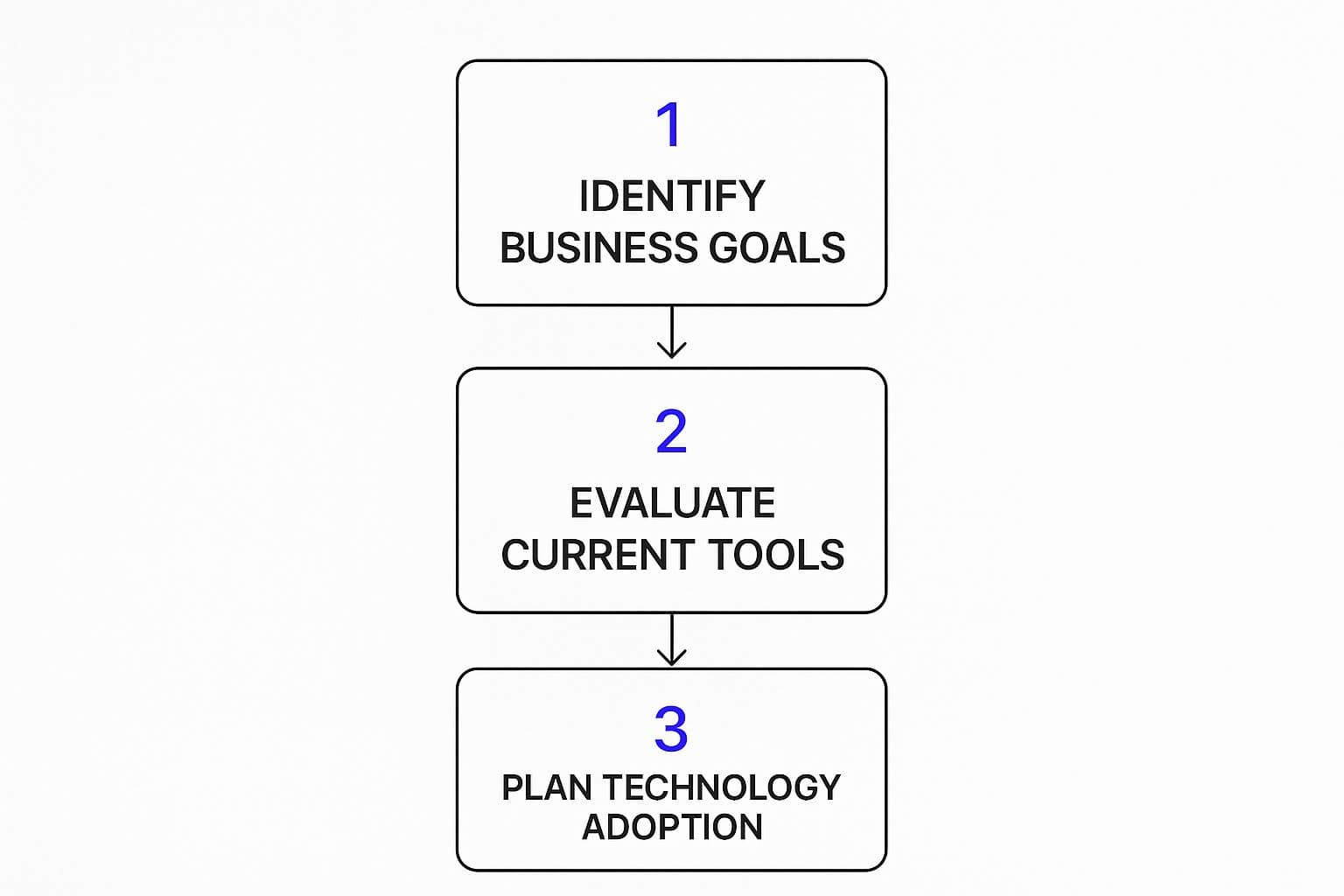
As you can see, choosing the technology should always be the last step. It has to be directly informed by your business goals and a clear-eyed view of what you're already working with.
Prioritize Initiatives for Quick Wins
Here’s a reality check: you can't do everything at once. Trying to will just lead to burnout. The secret to keeping up your momentum is to prioritize everything based on a simple formula: impact versus effort. This approach helps you lock in some quick wins, which builds confidence and frees up resources for the bigger, more complex projects later on.
I always advise clients to map this out on a simple chart:
- High-Impact, Low-Effort: These are your golden tickets. Start here! A perfect example is setting up an email marketing tool like Mailchimp to reconnect with past customers. It’s relatively easy to do but can bring in new sales almost immediately.
- High-Impact, High-Effort: These are your big, game-changing projects. Think about implementing a full Customer Relationship Management (CRM) system like HubSpot. You absolutely should plan for these, but don't make them your starting point.
- Low-Impact, Low-Effort: Nice to have, but not essential. Tackle these when you have a bit of spare time, but don’t let them distract you from the real priorities.
- Low-Impact, High-Effort: Avoid these like the plague. They are resource drains with almost nothing to show for it.
Suddenly, that long, intimidating to-do list becomes a manageable, step-by-step plan. Your roadmap is now an empowering guide, not an overwhelming document.
The sheer scale of global investment in these tools shows just how critical they are. Worldwide spending on digital transformation is on track to hit a staggering $3.9 trillion by 2027, with AI and automation leading the charge. For a small business, a focused approach on core functions like operations and marketing is how you tap into that potential. If you want to learn more about this, you can discover how small businesses can keep up with these advances in digital technology. This data makes one thing crystal clear: having a solid plan is more critical than ever to make sure your investments pay off.
Choosing the Right Tools Without Breaking the Bank
Once your strategy is mapped out, you hit what many small business owners find to be the most daunting part: picking the actual technology. It’s a crowded marketplace out there, and every software vendor claims they have the magic solution. For a small business, a bad choice isn't just a bump in the road—it’s a real waste of time and money you can't afford to lose.
The secret is to tune out the noise and zero in on what truly provides value. Your mission isn't to find the flashiest new app, but the right tool for the job. That means software that solves a specific problem you've already identified, is genuinely easy for your team to use, and doesn't demand a huge financial leap of faith.
Focus on the High-Impact Essentials First
For most small businesses I've worked with, a successful digital shift comes down to getting three core systems right. These are the workhorses that deliver the biggest bang for your buck by automating grunt work and giving you the data you need to make smarter decisions.
- Customer Relationship Management (CRM): A solid CRM is your command center for every customer touchpoint. It helps you graduate from messy spreadsheets and sticky notes to a single, organized hub for tracking leads, sales, and conversations.
- Cloud Accounting Software: This one is non-negotiable for any modern business. Tools like Xero or QuickBooks Online automate invoicing, track expenses, and give you a real-time pulse on your financial health, saving you countless hours.
- Project Management Tools: As you grow, keeping everyone on the same page gets harder. A simple platform like Asana, Trello, or Monday.com brings much-needed clarity, showing who’s doing what and when, so crucial tasks stop falling through the cracks.
Starting with these essentials builds a powerful foundation. They tackle the most common pain points—disorganized sales, chaotic finances, and sloppy project tracking—and give you some quick, tangible wins.
I once consulted for a local plumbing company literally drowning in paperwork. They invested in a simple scheduling and dispatch app that cost less than $50 a month. The result? They cut scheduling errors by over 90% and could get technicians to urgent jobs 30% faster. That's a massive return from a tiny, smart investment.
Comparing Essential Software for Small Businesses
To make sense of the options, it helps to see how different tools stack up. This table breaks down the main software categories and what you should look for when making a decision.
| Software Category | Top Contenders for SMBs | Key Deciding Factors |
|---|---|---|
| CRM | HubSpot CRM, Zoho CRM, Freshsales | Ease of use, integration with email, scalability of pricing. |
| Cloud Accounting | QuickBooks Online, Xero, FreshBooks | CPA preference, payroll features, e-commerce integrations. |
| Project Management | Asana, Trello, Monday.com, ClickUp | Visual workflow style (boards vs. lists), team size, automation. |
| Email Marketing | Mailchimp, ConvertKit, MailerLite | Audience size (for pricing), automation capabilities, ease of use. |
| E-commerce Platform | Shopify, WooCommerce, BigCommerce | Transaction fees, design flexibility, app ecosystem. |
Choosing the right software is about finding the best fit for your specific operations. Use this as a starting point to explore what will work best for your team and your customers.
A Simple Framework for Vetting Software
It’s incredibly easy to get mesmerized by a long list of features. To stay grounded, use a simple evaluation framework. Before you sign on any dotted line, make sure you can answer these three questions.
- Will It Scale With You? The tool that’s perfect today should still be useful in two years. Look for software with tiered pricing plans. You can start on a basic, affordable tier and only upgrade when your business truly needs the more advanced features. This way, you’re not paying for power you don’t use.
- Is It Genuinely Easy to Use? The most sophisticated software on earth is worthless if your team finds it clunky and confusing. Always favor tools with an intuitive design and a reputation for excellent customer support. The less training needed, the faster you’ll get your money’s worth.
- Does It Play Well with Others? Your tech should function like a team, not a collection of disconnected parts. Before buying, check if a new tool can integrate with the software you already rely on. For example, does your e-commerce site automatically sync sales data with your accounting software? These connections are huge time-savers.
Picking the right combination of tools is a critical piece of your overall strategy. If you're building out a new digital product or service, you can learn more about how to choose your technology stack in our detailed guide.
Smart Tactics to Maximize Your Budget
You don't need a Silicon Valley budget to access powerful tools. With a savvy approach, you can get everything you need without overspending.
- Lean Heavily on Free Trials: Never buy software without taking it for a proper test drive. Sign up for that 14- or 30-day trial and use it for a real project. It’s the single best way to know if it actually fits your workflow.
- Embrace "Freemium" Models: Many fantastic tools, like HubSpot CRM or Mailchimp, offer a surprisingly robust free version that’s perfect for businesses just starting out. You can get a ton of value without spending a penny.
- Look for Niche Alternatives: The big brands are great, but there are often smaller, more focused competitors offering 80% of the functionality for 20% of the price. A quick search for "[Big Brand] alternatives" can uncover some real hidden gems.
Modernizing Your Processes and Empowering Your Team
Let's be honest: great technology is only half the battle. The most powerful software in the world will just sit there collecting digital dust if your people don't use it and your processes don't adapt. Real digital transformation happens when your team and workflows are perfectly in sync with your new tools.
This is where you have to roll up your sleeves and focus on the human side of change. The first thing you need is a crystal-clear picture of how work gets done right now. Map out your key business processes from start to finish. I don't mean just thinking about it—I mean actually drawing it out on a whiteboard or with a flowchart tool. You'd be amazed at the bottlenecks and time-wasting steps that jump out at you once you see it visually.
Uncovering Hidden Inefficiencies
Think about a process you do every day, like client onboarding. What are all the little steps that have to happen? It probably looks something like this:
- A potential client fills out a contact form.
- Someone on your team has to manually send a follow-up email.
- You schedule a discovery call, which usually means a few back-and-forth emails finding a time.
- A proposal is built from scratch and sent for review.
- The contract gets signed and scanned back.
- An invoice for the initial deposit is manually created and emailed.
- The client is finally added to your project management system and shared folders.
When you lay it all out, the weak spots become glaringly obvious. Every single one of those manual handoffs is a point where a delay can happen or a detail can get dropped. This is where your new tech stops being just another subscription fee and starts being a genuine problem-solver.
I once worked with a small consultancy that completely redesigned its client onboarding. By using a simple CRM with automation, they replaced the manual emails with a timed sequence of welcome messages. A scheduling tool like Calendly cut out the back-and-forth for calls, and a shared digital workspace gave clients instant access to project files the moment they signed. The result? They saved over 20 hours of admin work every single month and radically improved the client experience from day one.
This kind of process modernization is the heart of a successful transformation. It’s all about looking at how you work and asking, "How can our technology do the heavy lifting for us?"
Getting Your Team Excited About Change
Let’s face it, introducing new software can be met with skepticism or even outright resistance. That’s completely normal. Your team has established routines, and change, even good change, can feel disruptive. The key is to manage this transition with empathy and clear communication. It's less about enforcing a new rule and more about building genuine buy-in.
The single most effective way to do this is to focus on the "what's in it for them." Don't just announce, "We're now using this new project management tool." That’s a recipe for eye-rolls.
Instead, frame it around the benefits that directly impact their day-to-day. Show them how the new tool will eliminate their most tedious tasks—the ones they complain about—freeing them up for more creative and fulfilling work. When your team sees a new piece of software as something that makes their job easier, their perspective shifts from resistance to curiosity.
Providing Training That Actually Sticks
Effective training is so much more than just sending over a link to a help document and hoping for the best. To make sure your team feels confident, your training needs to be hands-on and directly relevant to their specific roles.
Here’s how to make it stick:
- Involve Them Early: Ask for your team’s input during the software selection process. People are far more likely to support a decision they helped make. It also ensures the tool you pick actually solves their real-world problems.
- Create Role-Specific Training: A one-size-fits-all demo is a waste of time. Show your sales team exactly how the CRM will help them track leads. Show your project managers exactly how the new software will help them monitor deadlines. Make it personal.
- Appoint a "Champion": Find an enthusiastic team member who can become the go-to expert for the new tool. This peer-to-peer support is often more approachable and effective than having to go to a manager with every small question.
- Celebrate Small Wins: When a team successfully uses the new system to close a deal faster or finish a project ahead of schedule, make a big deal out of it! Publicly acknowledging progress reinforces the value of the change and builds positive momentum.
Fostering this kind of adaptive culture is what separates the businesses that merely survive from those that thrive. If you want to build a team that embraces continuous improvement, you can master the agile product development process and apply its principles not just to products, but to your internal changes as well.
How to Measure What Truly Matters

You’ve put in the work—the planning, the investment, the team training. But how do you actually know if it's all paying off? This is where so many small business digital transformation efforts fall flat. Without proper measurement, you’re just flying blind, making decisions based on gut feelings instead of hard data.
The trick is to look beyond the "vanity metrics" like social media likes or a jump in website visits. Instead, you need to zero in on the Key Performance Indicators (KPIs) that directly link back to your business goals. Measurement isn't just about patting yourself on the back; it's about learning what really works so you can do more of it.
Connecting Metrics to Your Goals
The right KPIs are completely dependent on what you set out to achieve in the first place. Your metrics have to be a direct reflection of the problems you wanted to solve.
For example, if your main goal was to boost operational efficiency, obsessing over marketing numbers would be a waste of time. Your focus should be on internal metrics that show real, tangible improvements.
- Cost Per Transaction: Did that new accounting software actually lower the cost of processing an order?
- Time to Fulfill an Order: Is your new inventory system helping you ship products out the door faster?
- Time to Resolve a Customer Issue: Has your updated support software cut down the time it takes to make a customer happy again?
On the flip side, if your transformation was all about building deeper customer relationships, your dashboard would tell a completely different story.
- Repeat Purchase Rate: Are customers coming back more often since you launched that new loyalty program?
- Customer Lifetime Value (CLV): Is the total revenue you earn from a single customer going up?
- Net Promoter Score (NPS): Are your customers more likely to recommend you to their friends and family? You can even check out our guide on how to conduct market research to learn how to gather this kind of crucial feedback.
My Advice: Don't try to track everything. Just track what matters. Pick three to five core KPIs that directly measure whether you're hitting your main objective. This keeps you from getting lost in a sea of data.
The proof is in the numbers. Across all types of businesses, 87% have used technology to boost profits in the last two years. Even better, 59% of them saw profits jump by at least 11% from their digital efforts. Specific tech, like cloud computing, has led to cost savings and productivity gains for a staggering 95% of European companies.
Using Dashboards to Stay on Track
Thankfully, you don't need a data science degree to see how you're doing. Most modern software, from CRMs to accounting tools, comes with built-in dashboards that make tracking your KPIs incredibly simple.
These aren't just fancy charts; they are your business's command center. A well-set-up dashboard gives you a real-time snapshot of your company's health, letting you spot trends, catch problems early, and jump on opportunities the moment they appear.
Think of a local coffee shop owner. They could use their point-of-sale system's dashboard to see that their new mobile ordering app is driving a 25% increase in morning sales. Armed with that knowledge, they can double down on promoting the app to keep the momentum going.
The Continuous Loop of Improvement
Here’s the most important thing to remember: digital transformation isn't a one-and-done project. It’s a constant cycle of doing, measuring, and refining. Your data isn’t just a report card; it's a roadmap for what to do next.
This feedback loop is what keeps your business agile and ready for whatever comes next.
- Act: You roll out a new tool or process to solve a specific problem.
- Measure: You track the handful of KPIs that show you the impact.
- Refine: Based on what the data tells you, you either scale up what's working or tweak your approach.
This ongoing process ensures your technology and strategies are always working toward your goals, helping you make smarter decisions and stay ahead of the competition.
Answering Your Top Questions About Digital Transformation
Even with the best roadmap, jumping into a digital transformation project is bound to stir up some questions. That’s perfectly normal. Let's tackle some of the most common "what ifs" I hear from small business owners so you can move forward with confidence.
"My Budget Is Tiny. Can I Still Do This?"
Yes, you absolutely can. It’s a huge misconception that you need a massive war chest to get started. For a small business, this is about being strategic and resourceful, not just throwing money at problems.
The trick is to focus on high-impact, low-cost solutions that solve your most painful bottleneck right now.
You probably have access to powerful tools already. Think about using Google Workspace for better team collaboration or the free tier of Mailchimp for email marketing. Even a free CRM from a provider like HubSpot can completely change how you manage customer relationships. The point isn't to buy a dozen new tools at once.
Honestly, a powerful first step can be as simple as ditching paper timesheets for a mobile app that tracks hours and syncs with your payroll. Solve one specific problem, prove the value, and then reinvest the time and money you save into the next project. It’s all about building momentum.
"How Do I Get My Team on Board if They Hate New Tech?"
This is probably the most important question of all because your team's buy-in will make or break any new initiative. The answer comes down to empathy and focusing on what’s in it for them. Resistance usually isn't about the technology itself; it's about the fear of change or the hassle of learning something new.
Start by framing the change around making their lives easier. Show them exactly how a new tool will eliminate the tedious tasks they despise, freeing them up to do more interesting, high-value work.
Next, bring them into the conversation early. Don't just announce a new system. Ask for their input on the daily frustrations they face and what a perfect solution would look like to them. When people help create something, they naturally want to see it succeed.
Finally, make the training practical and hands-on, not just a generic user manual. To really drive adoption, try these moves:
- Find a Champion: Pick an enthusiastic team member to be the go-to person for questions. Peer support often feels much more approachable than going to a manager.
- Celebrate the Wins: When someone uses the new tool to finish a project ahead of schedule, make a big deal out of it. This creates positive proof that the change is working.
"What's the Single Biggest Mistake I Should Avoid?"
Easy. The most common and costly mistake is buying technology before you’ve clearly defined the problem you're trying to solve. It’s the classic "shiny object syndrome"—getting wowed by a new app without first asking, "What specific business pain will this fix?"
This path almost always leads to wasted money, a frustrated team, and a sophisticated tool that nobody uses. It’s putting the cart miles ahead of the horse.
Always start with the problem, not the product. For example:
- The Problem: "Our inventory is a mess. We keep selling items online that are out of stock, which makes customers angry."
- The Solution: "We need an inventory system that syncs in real-time with our e-commerce store."
Once the problem is that clear, then you can go find the right technology. It’s a simple shift in thinking, but it changes everything.
"How Long Is This Whole Thing Supposed to Take?"
Think of digital transformation less like a project with a finish line and more like a continuous part of how you run your business. That said, the individual initiatives within your larger strategy should absolutely have clear, manageable timelines.
For instance, implementing a new customer support platform might be a two-month project from research to full team rollout. Building a simple e-commerce site could be a three-month sprint.
The goal is to break your big-picture vision into smaller, bite-sized projects. This approach gets you tangible results faster, which is fantastic for morale and your cash flow. It also lets you learn and adapt as you go. This is all about committing to continuous improvement, not a stressful, one-and-done overhaul.
Ready to turn your business idea into a reality without the typical delays? The team at Iglu Digital specializes in building market-ready MVPs on a fixed price, agreed up front. We help you launch quickly, gather real user feedback, and build a product that truly solves problems. Start building with us today!