

8 Essential Software Deployment Best Practices for 2025
Table of Contents
In today's competitive market, the ability to release software quickly, reliably, and safely is a non-negotiable requirement for success. A single failed deployment can trigger cascading failures, leading to costly service outages, eroding customer trust, and directly impacting revenue. Despite these high stakes, many development teams continue to grapple with manual, error-prone, and high-stress release processes. This friction not only slows down innovation but also creates a culture of fear around shipping new features.
This guide is designed to cut through the noise. We are moving beyond generic advice to provide a detailed roundup of the most effective software deployment best practices leveraged by top-performing engineering organizations. Instead of treating deployments as a chaotic, all-hands-on-deck event, you will learn how to transform them into a streamlined, predictable, and automated part of your daily workflow.
Throughout this comprehensive listicle, we will dissect eight mission-critical strategies that address the entire release lifecycle. You will gain actionable insights on how to implement:
- Continuous Integration/Continuous Deployment (CI/CD) to automate your build, test, and release pipeline.
- Advanced deployment patterns like Blue-Green and Canary Deployments to minimize risk.
- Feature Flags to decouple deployment from release, enabling safer rollouts.
- Infrastructure as Code (IaC) to create consistent and repeatable environments.
- Robust Automated Testing and clear Rollback Strategies to build a safety net.
- Environment Parity to eliminate the dreaded "it worked on my machine" problem.
By adopting these modern software deployment best practices, you can empower your team to ship code with confidence, accelerate your feedback loops, and ultimately deliver more value to your users, faster. Let's explore the methodologies that make flawless deployments the new standard.
1. Continuous Integration/Continuous Deployment (CI/CD)
Continuous Integration/Continuous Deployment (CI/CD) stands as a cornerstone of modern software development, representing a pivotal shift from manual, error-prone deployment cycles to a fully automated and streamlined process. It’s not just a set of tools; it's a culture and a methodology that empowers development teams to deliver value to users faster and more reliably. This approach is a fundamental component of effective software deployment best practices.
Continuous Integration (CI) is the practice of developers frequently merging their code changes into a central repository. After each merge, an automated build and test sequence is triggered. This ensures that new code integrates smoothly with the existing codebase and that regressions are caught early, preventing the integration headaches that often plague larger projects.
Continuous Deployment (CD) extends this automation further. Once code successfully passes all automated tests in the CI stage, it is automatically deployed to a production environment. This practice eliminates manual gates, enabling a rapid flow of new features and fixes directly to your users.
Why CI/CD is a Top Deployment Practice
Implementing a CI/CD pipeline offers significant advantages, particularly for teams aiming for agility and quality. The core benefits include:
- Accelerated Delivery: Automating the build-test-deploy cycle drastically reduces the time from code commit to production, allowing for faster feedback loops and quicker feature delivery. Companies like Amazon and Netflix leverage this to deploy thousands of times per day.
- Improved Reliability: By automating tests at every stage, CI/CD minimizes human error and ensures a consistent, repeatable deployment process. This leads to higher quality releases and more stable applications.
- Reduced Risk: Deploying smaller, incremental changes is inherently less risky than large, infrequent releases. If an issue arises, it is easier to pinpoint the cause and execute a swift rollback.
- Enhanced Developer Productivity: Automation frees developers from manual deployment tasks, allowing them to focus on what they do best: writing high-quality code and building valuable features.
The following infographic illustrates the core workflow of a typical CI/CD pipeline, showing how code moves from a developer's machine to a live environment.
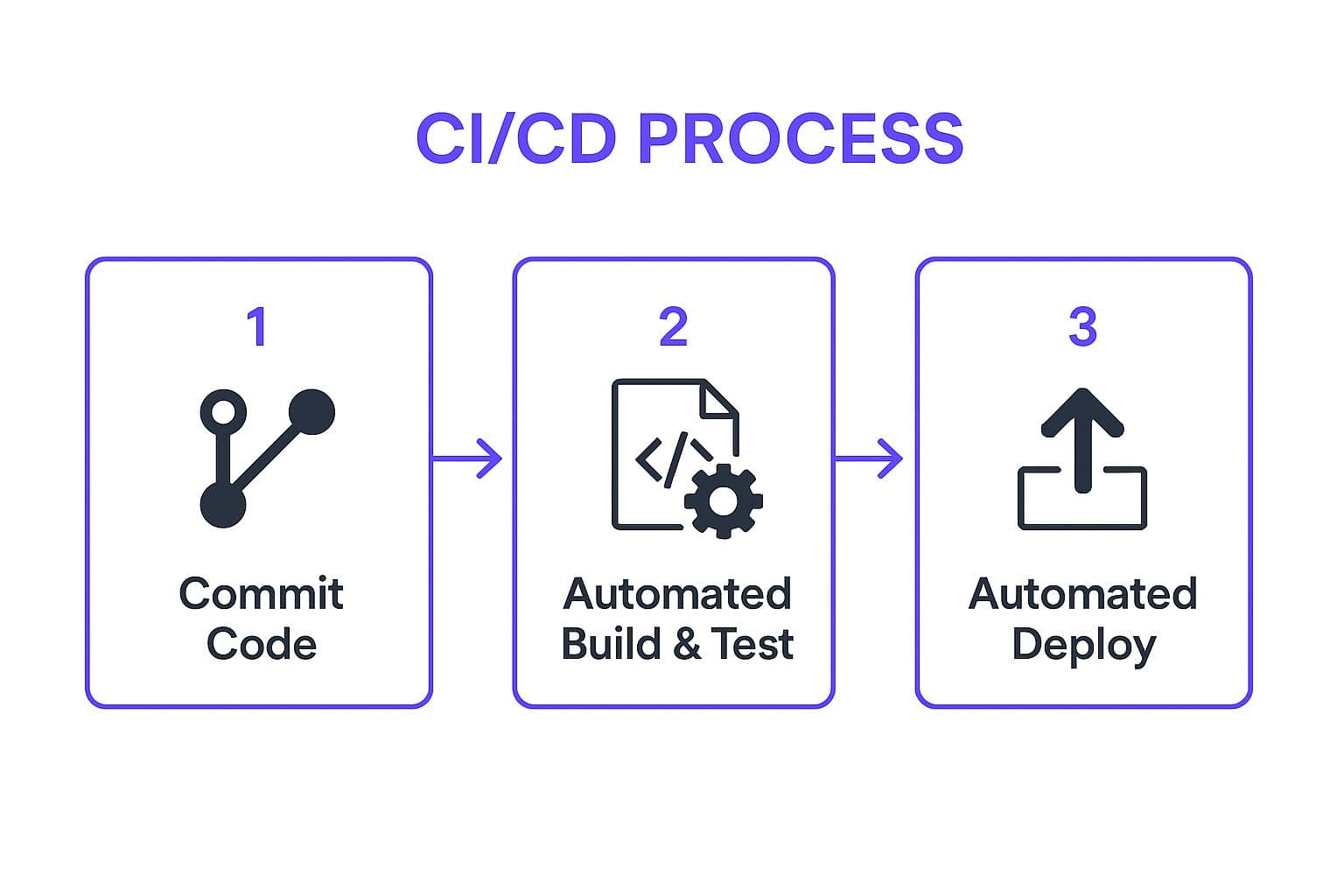
This streamlined, three-step process forms the backbone of CI/CD, creating a predictable and efficient pathway for every code change.
2. Blue-Green Deployment
Blue-Green Deployment is a sophisticated release strategy designed to eliminate downtime and reduce deployment risk. It involves maintaining two identical, isolated production environments, aptly named "Blue" and "Green." At any given moment, only one environment is live and serving all production traffic (e.g., the Blue environment), while the other (Green) sits idle or serves as a staging ground for the next release.

The new version of the software is deployed to the idle Green environment. Here, it can be thoroughly tested against production-like conditions without impacting any users. Once the new version is verified and ready, a router or load balancer instantly switches traffic from the Blue environment to the Green one. The Green environment is now live, and the Blue environment becomes idle, ready for the next deployment cycle. This technique is a cornerstone of modern software deployment best practices for achieving high availability.
Why Blue-Green Deployment is a Top Deployment Practice
Adopting a Blue-Green deployment model provides a robust framework for safe, seamless releases, especially in systems where availability is critical. Pioneered by thought leaders at places like ThoughtWorks and widely adopted by tech giants, its benefits are clear:
- Near-Zero Downtime: The traffic switch is instantaneous, meaning users experience no interruption of service during the update. This is crucial for applications that require 24/7 availability.
- Instant Rollback: If the new version in the Green environment exhibits problems after the switch, rolling back is as simple as redirecting traffic back to the stable Blue environment. This provides a powerful safety net.
- Reduced Deployment Risk: Since the new version is fully tested in an identical production environment before going live, the chances of deploying a faulty release are significantly minimized.
- Simplified Release Process: The entire process is straightforward and less stressful for development teams compared to complex in-place upgrades. Companies like Netflix and Adobe leverage this method to ensure their widely used services remain stable during frequent updates.
Tips for a Successful Blue-Green Deployment
To effectively implement this strategy, consider the following practical steps:
- Plan Your Database Strategy: Ensure your database schema supports both the old and new versions of the application simultaneously, or devise a strategy for seamless data migration. This is often the most challenging aspect of Blue-Green deployments.
- Automate the Switch: Use a load balancer or router that can be programmatically controlled to make the traffic switch quick and reliable.
- Implement Comprehensive Health Checks: Before flipping the switch, run a suite of automated health checks and tests on the new environment to confirm its stability and correctness.
- Monitor Both Environments: During the transition, closely monitor both the old and new environments to catch any anomalies immediately.
- Combine with Feature Flags: Use feature flags to selectively enable new functionality for certain users even before the full traffic switch, allowing for controlled, incremental rollouts.
3. Canary Deployment
Canary deployment is a strategic, risk-averse rollout technique where a new software version is gradually released to a small subset of users before making it available to everyone. This method gets its name from the "canary in a coal mine" analogy, where the small user group acts as an early warning system. By closely monitoring this group, teams can detect bugs, performance issues, or negative user reactions in a controlled environment, minimizing the potential impact of a faulty release. This approach is a cornerstone of reliable software deployment best practices.

The process begins by routing a small percentage of traffic, perhaps just 1% or 5%, to servers running the new version while the majority remains on the stable, existing version. If this initial "canary" group shows no issues against predefined metrics, the traffic percentage is gradually increased. This continues until the new version serves 100% of traffic, at which point the old version can be decommissioned.
Why Canary Deployment is a Top Deployment Practice
Canary deployment offers a powerful way to de-risk production releases, making it essential for organizations that cannot afford downtime or a poor user experience. The primary benefits include:
- Minimized Blast Radius: By exposing a new version to a limited audience first, any potential negative impact is contained. A critical bug affects only a small fraction of users, not the entire user base.
- Real-World Testing: This strategy allows you to test new code with real production traffic and user behavior, providing insights that are impossible to gain in staging environments. Companies like Microsoft use this for Office 365 updates to validate changes under real-world conditions.
- Data-Driven Decisions: Instead of relying on guesswork, teams can use concrete performance metrics (latency, error rates) and business metrics (conversion rates, user engagement) to decide whether to proceed with a full rollout or to roll back.
- Zero-Downtime Releases: Canary deployments facilitate seamless transitions between versions without requiring application downtime, ensuring a continuous and positive user experience.
- Quick and Safe Rollback: If the canary release performs poorly, reverting is simple. You just redirect all traffic back to the old, stable version and investigate the issue offline without causing a major incident.
4. Feature Flags (Feature Toggles)
Feature Flags, also known as Feature Toggles, are a powerful technique that allows teams to modify system behavior without changing or deploying new code. They act as dynamic on/off switches within the application, enabling specific functionalities to be enabled or disabled at runtime. This practice fundamentally decouples the act of deploying code from the act of releasing features, offering granular control over what users see and experience. It is an indispensable part of any modern software deployment best practices toolkit.
This technique involves wrapping new or experimental features in a conditional block of code. The decision to execute this code is determined by the state of a "flag," which can be managed externally through a configuration file or a dedicated management service. This allows teams to safely merge new code into the main branch and deploy it to production, keeping the associated feature hidden until it's ready for a controlled release.
Why Feature Flags are a Top Deployment Practice
Implementing feature flags provides a strategic advantage for managing the entire feature lifecycle, from development and testing to a full rollout. The key benefits include:
- Risk Mitigation and Safe Releases: Feature flags enable "dark launches," where new code is deployed to production but remains inactive. This allows for testing in a live environment without impacting users. If a problem is discovered, the feature can be instantly disabled with the flip of a switch, avoiding a stressful emergency rollback.
- Decoupled Deployment and Release: Teams can continuously deploy code to production on a regular schedule, even if features aren't complete. The release of those features to users becomes a separate, deliberate business decision, not a technical one. Companies like GitHub and Slack use this extensively to test new UI changes and tools with internal teams before a wider release.
- Canary Releases and A/B Testing: Flags facilitate progressive delivery. You can release a feature to a small subset of users (e.g., 1% of your user base, or only users in a specific region) to gather feedback and monitor performance. This same mechanism powers A/B testing, allowing you to test different versions of a feature simultaneously.
- Simplified Rollbacks and Incident Management: When a deployed feature causes issues, a traditional rollback can be complex and time-consuming. With a feature flag, the fix is immediate: simply turn the flag off. This dramatically reduces the mean time to recovery (MTTR) for feature-related incidents.
5. Infrastructure as Code (IaC)
Infrastructure as Code (IaC) is the practice of managing and provisioning computing infrastructure through machine-readable definition files, rather than physical hardware configuration or interactive configuration tools. This approach treats infrastructure setup as a software development project, applying principles like version control, testing, and automation. By codifying infrastructure, IaC is a critical element of modern software deployment best practices, ensuring environments are consistent and reproducible.
This method shifts infrastructure management from manual, ad-hoc setups to a declarative or imperative model. Declarative IaC (e.g., Terraform, AWS CloudFormation) allows you to define the desired end state of your infrastructure, and the tool handles the "how." Imperative IaC (e.g., Ansible, Chef scripts) defines the specific commands needed to achieve the configuration, giving you granular control over the steps.
Why IaC is a Top Deployment Practice
Adopting IaC fundamentally transforms how teams manage their operational environments, leading to significant gains in efficiency and stability. The primary benefits include:
- Consistency and Repeatability: IaC eliminates configuration drift by ensuring every environment, from development to production, is provisioned from the same source-controlled definitions. This guarantees consistency and removes "it works on my machine" issues.
- Speed and Scalability: Automating infrastructure provisioning dramatically accelerates the setup of new environments. Companies like Netflix use IaC to manage their massive global streaming infrastructure, enabling them to scale resources up or down rapidly in response to demand.
- Version Control and Auditability: Storing infrastructure definitions in a version control system like Git provides a complete history of all changes. This makes it easy to audit who changed what and when, and to roll back to a previous known-good state if a deployment introduces problems.
- Enhanced Security: By codifying security rules and policies, IaC allows for automated security scanning and validation before deployment. Teams can enforce best practices, such as the principle of least privilege, consistently across all environments. For many organizations, this is a key step in their digital transformation journey.
6. Automated Testing in Deployment Pipeline
Automated testing within the deployment pipeline is a non-negotiable practice for ensuring code quality and system reliability. It involves integrating a suite of automated tests that run at different stages of the CI/CD process, acting as a crucial quality gate before code progresses toward production. This proactive approach to validation is a fundamental software deployment best practice.
This practice moves beyond simple unit tests and encompasses a multi-layered strategy. It includes unit tests to verify individual components, integration tests to ensure different parts of the application work together correctly, and end-to-end (E2E) tests that simulate real user workflows. By automating these checks, teams receive rapid feedback, catching bugs and regressions almost immediately after a code change is introduced.
Why Automated Testing is a Top Deployment Practice
Integrating comprehensive automated testing directly into your pipeline provides a safety net that enables both speed and stability. The core benefits are transformative for development teams:
- Increased Confidence and Speed: When developers know that a robust set of tests will automatically validate their changes, they can commit and deploy code with greater confidence. This reduces hesitation and accelerates the entire development lifecycle.
- Early Bug Detection: Automated tests catch defects early in the pipeline, often within minutes of a code commit. This makes issues significantly cheaper and easier to fix compared to finding them in production.
- Improved Code Quality: A strong testing culture encourages developers to write more modular, testable, and maintainable code from the start. It creates a positive feedback loop that elevates the overall quality of the codebase.
- Consistent and Reliable Validation: Automation removes the potential for human error inherent in manual testing. Every deployment is subjected to the exact same rigorous validation process, ensuring consistent quality standards are met every time. Companies like Google and Microsoft rely on massive-scale automated testing to maintain quality across complex products like Windows and their developer tool suite.
To better understand the different layers of verification, you can explore various quality assurance testing methods on iglu.dev. Implementing a well-structured testing strategy is essential for building a resilient deployment process.
7. Rollback Strategy and Version Control
Even with the most rigorous testing, production issues can still occur. A robust rollback strategy is an essential safety net, providing a planned, systematic way to revert a deployment to a previous, stable state. This practice isn't just about code; it encompasses the entire application state, including databases and infrastructure configurations, and is a critical software deployment best practice. It is the prepared response to an unforeseen failure, ensuring business continuity and user trust.
A comprehensive rollback plan, tightly integrated with version control systems like Git, ensures that every deployment is reversible. Version control acts as a historical record, allowing teams to pinpoint the exact state to which they need to revert. Rollback mechanisms are the automated or semi-automated procedures that execute this reversion quickly and reliably when a critical issue is detected.
Why a Rollback Strategy is a Top Deployment Practice
Having a well-defined rollback strategy is not a sign of failure but a mark of a mature and resilient engineering culture. The primary benefits are focused on risk mitigation and operational stability.
- Minimized Downtime: A swift, practiced rollback procedure drastically reduces the mean time to recovery (MTTR). Instead of scrambling to patch a live issue, teams can immediately restore service and diagnose the problem offline. Companies like Stripe rely on this for their financial systems where downtime is unacceptable.
- Increased Deployment Confidence: Knowing there's a reliable safety net encourages teams to deploy more frequently. This supports agile development and allows for faster delivery of value without the fear of catastrophic failures.
- Protection of User Experience: Quickly reverting a faulty release prevents widespread user impact, protecting the company's reputation and user satisfaction. This is crucial for customer-facing platforms where a single bad deployment can have significant consequences.
- Systematic Problem Resolution: A rollback provides breathing room. It stabilizes the system, allowing developers to perform a thorough root cause analysis without the immense pressure of a live production outage.
A well-documented rollback plan is a key component of any successful release. For teams looking to formalize their entire release process, a comprehensive product launch checklist on iglu.dev can provide an invaluable framework, ensuring that critical steps like rollback planning are never overlooked.
8. Environment Parity and Configuration Management
Environment parity is the practice of keeping your development, staging, and production environments as similar as possible. When combined with robust configuration management, it forms a powerful strategy to eliminate the notorious "it worked on my machine" problem. This approach ensures applications behave predictably as they move through the deployment pipeline, making it a critical software deployment best practice.
The core idea is to minimize the drift between environments. Environment Parity focuses on consistency in operating systems, package versions, network topology, and other dependencies. Configuration Management complements this by externalizing environment-specific settings, like database credentials or API keys, from the application code. This separation allows the same codebase to run across different environments by simply applying the correct configuration.
Why Parity and Configuration Management are Essential
Adopting this dual practice significantly de-risks the deployment process and enhances operational stability. The key benefits include:
- Predictable Deployments: By ensuring staging mirrors production, you can catch environment-specific bugs before they impact users. This significantly increases confidence in each release.
- Reduced Deployment Failures: Inconsistencies between environments are a leading cause of deployment failures. Parity directly mitigates this risk, ensuring smoother and more reliable deployments.
- Enhanced Security: Separating configuration, especially sensitive secrets, from the codebase prevents them from being accidentally committed to version control. Tools like HashiCorp Vault or AWS Secrets Manager provide secure storage and access control for this data.
- Improved Developer Velocity: Developers can work with high-fidelity environments, reducing time spent debugging issues that only appear in production. This streamlines the development and testing cycle.
A prime example is the Twelve-Factor App methodology, which champions storing config in the environment. Modern platforms like Kubernetes use ConfigMaps and Secrets to manage this effectively, while containerization tools like Docker are instrumental in achieving environment parity by packaging an application with all its dependencies. This approach creates a consistent, portable artifact that runs identically everywhere.
Best Practices Deployment Methods Comparison
| Item | Implementation Complexity 🔄 | Resource Requirements ⚡ | Expected Outcomes 📊 | Ideal Use Cases 💡 | Key Advantages ⭐ |
|---|---|---|---|---|---|
| Continuous Integration/Continuous Deployment (CI/CD) | High - Setup pipelines, tooling, cultural changes | Moderate to High - Infrastructure & tooling | Faster releases, fewer errors, improved code quality | Teams needing rapid, frequent software delivery | Automated testing, consistent deployments, early feedback |
| Blue-Green Deployment | Medium - Requires duplicate environments | High - Double infrastructure | Near-zero downtime, quick rollback | High-availability apps, services needing zero downtime | Instant traffic switch, environment isolation, rollback |
| Canary Deployment | High - Complex traffic routing & monitoring setup | Moderate - Monitoring tools & infrastructure | Gradual rollout, early issue detection | Progressive rollouts, mitigating risk on critical apps | Minimized user impact, data-driven releases, controlled exposure |
| Feature Flags (Feature Toggles) | Medium - Requires disciplined flag management | Low to Moderate - Infrastructure for flagging | Decoupled releases, instant feature control | A/B testing, controlled feature rollouts | Quick rollback, targeted features, supports trunk-based dev |
| Infrastructure as Code (IaC) | High - Learning curve, complex setups | Moderate - Tooling & automated provisioning | Consistent, repeatable infrastructure | Environments requiring repeatability and scalability | Environment consistency, faster provisioning, reduced drift |
| Automated Testing in Deployment Pipeline | High - Test automation and maintenance effort | Moderate - Testing infrastructure | Early bug detection, improved reliability | Projects prioritizing code quality and reliability | Fast feedback, comprehensive coverage, issue prevention |
| Rollback Strategy and Version Control | Medium to High - Planning rollbacks, DB handling | Low to Moderate - Storage/version control | Quick recovery from issues | Critical production environments needing fast recovery | Reduced MTTR, audit trails, improved system reliability |
| Environment Parity and Configuration Management | Medium - Setup for consistent environments | Moderate - Tools for config and secrets | Predictable app behavior, fewer environment issues | Multi-stage deployments with complex config needs | Reduced deployment surprises, better security, faster debugging |
Transform Your Deployments from Risk to Routine
Navigating the complex landscape of modern software delivery can feel daunting, but it doesn't have to be a source of constant stress or unpredictable outcomes. The eight software deployment best practices we've explored provide a comprehensive roadmap for transforming your release process from a high-risk, anxiety-inducing event into a predictable, routine, and even boring operation. And in the world of software development, "boring" is a remarkable achievement. It signifies stability, reliability, and the freedom to focus on innovation rather than firefighting.
The journey begins by shifting your mindset. Instead of viewing deployment as the final, perilous hurdle, see it as an integrated, continuous part of the development lifecycle. Embracing this perspective is the first step toward building a truly resilient and agile system.
Synthesizing the Core Principles
The power of these practices lies not in their isolated implementation but in their synergy. Consider how they interconnect to form a robust, self-reinforcing system:
- CI/CD Pipelines act as the central nervous system, automating the flow from code commit to production release. They provide the structure upon which all other practices are built.
- Automated Testing is the immune system of your pipeline, diligently catching bugs and regressions before they can impact users, ensuring that what you deploy is high-quality.
- Infrastructure as Code (IaC) and Environment Parity work hand-in-hand to eliminate the notorious "it works on my machine" problem. By codifying your infrastructure and ensuring consistency across development, staging, and production, you eradicate a massive source of deployment failures.
- Blue-Green and Canary Deployments are your advanced risk-mitigation strategies. They allow you to release changes to a subset of your infrastructure or users first, validating performance and stability in a live environment before committing to a full rollout.
- Feature Flags offer granular control, decoupling deployment from release. This powerful technique empowers you to test features in production with real users, perform A/B tests, and instantly disable a faulty feature without a full rollback.
- Rollback Strategies and Version Control provide the ultimate safety net. When all else fails, a well-defined and tested rollback plan, underpinned by Git, ensures you can revert to a stable state quickly and confidently.
Your Actionable Path Forward
Mastering these software deployment best practices is an iterative process. You don't need to implement everything overnight. The key for early-stage startups and entrepreneurs is to start small and build momentum.
- Start with the Foundation: If you're just beginning, focus on establishing a basic CI/CD pipeline with integrated automated testing. This is the non-negotiable cornerstone of modern deployment.
- Codify Everything: Make Infrastructure as Code and version control for your application and infrastructure code a day-one priority. This discipline will pay immense dividends in scalability and stability.
- Plan for Failure: Define your rollback strategy from the outset. Practice it. Knowing you can recover from a bad deployment reduces fear and encourages a faster release cadence.
- Adopt Advanced Strategies Gradually: Once your foundation is solid, begin experimenting with feature flags for new functionality. As your user base grows, explore canary releases or blue-green deployments to further de-risk the process.
By systematically integrating these principles, you move from a culture of fear to a culture of confidence. Deployments become a non-event, freeing your team to focus their energy where it matters most: building a product that delights your customers. This strategic approach is not just a technical detail; it is a fundamental business advantage that enables speed, fosters innovation, and builds a scalable foundation for long-term growth.
Ready to build your MVP on a rock-solid foundation without getting bogged down in the technical weeds? At Iglu Digital, we specialize in rapid, ready-to-launch product development that embeds these software deployment best practices from day one. Let us handle the complexities of building a scalable and reliable backend, so you can focus on your vision.